Single Sign-On (SSO)
Enterprise identity provider integration with OAuth2 and SAMLv2 support for streamlined authentication and access management
Introduction
Single Sign-On (SSO) enables users to authenticate using their existing corporate identity provider credentials, eliminating the need for separate LYNKS passwords and centralizing access management. SSO integration allows organizations to leverage their existing identity management infrastructure while maintaining centralized control over user authentication and access policies.
SSO provides seamless access to LYNKS by integrating with your organization's existing identity provider. Users authenticate once with their corporate credentials and gain access to LYNKS without managing separate passwords. This approach simplifies user experience while enabling IT departments to maintain centralized control over access policies, password requirements, and multi-factor authentication rules through their existing identity management systems.
Supported protocols
LYNKS supports industry-standard authentication protocols for SSO integration:
| Protocol | Description | Use Case |
|---|---|---|
| OAuth2 | Open standard for access delegation | Modern identity providers, mobile applications |
| SAMLv2 | Security Assertion Markup Language version 2 | Enterprise SSO, federated identity management |
Both protocols provide secure authentication and authorization flows, with OAuth2 commonly used for modern cloud-based identity providers and SAMLv2 frequently employed in traditional enterprise environments.
Supported identity providers
LYNKS can integrate with various identity providers that support OAuth2 or SAMLv2 protocols:
- Microsoft Azure Active Directory - Microsoft's cloud-based identity service
- Google Workspace - Google's enterprise identity platform
- Okta - Dedicated identity and access management platform
- Other OAuth2/SAMLv2-compliant providers - Subject to assessment and configuration
Organizations using other identity providers should contact LYNKS support to discuss integration possibilities and technical requirements.
Multiple SSO providers per tenant
LYNKS supports configuring multiple SSO identity providers within a single tenant, enabling flexible authentication strategies for diverse user bases.
Multi-provider scenarios
Multiple SSO providers are particularly valuable for:
- Fund administrators - Allowing different funds to authenticate using their own corporate identity providers
- Multi-organization tenants - Supporting users from various partner companies or subsidiaries
- Mergers and acquisitions - Maintaining separate identity providers during organizational transitions
- Client access - Enabling clients to use their own SSO while maintaining separate provider for internal staff
Provider selection
When multiple SSO providers are configured:
- Users see multiple SSO authentication buttons on the login screen
- Each button is labeled with the provider name or organization
- Users select the appropriate provider for their organization
- Authentication proceeds through the selected provider's flow
Configuration considerations
When configuring multiple SSO providers:
- Each provider requires separate configuration and credential setup
- User email domains can be mapped to specific providers for automatic routing
- Provider branding and naming should clearly identify the organization
- Testing should cover all configured providers independently
User management
With multiple providers configured:
- Users are associated with a specific identity provider
- Email address uniquely identifies users across providers
- Permission and access control remain tenant-level, not provider-specific
- Users from different providers can collaborate within the same tenant
This flexibility enables fund administrators and service providers to offer LYNKS access to multiple client organizations while maintaining each client's preferred authentication infrastructure and security policies.
Authentication flow
The SSO authentication process follows a redirect-based flow that leverages your identity provider's existing authentication mechanisms.
Login process
- User navigates to the LYNKS login page
- User clicks on their identity provider button (e.g., "Microsoft")
- LYNKS redirects the user to the identity provider's login page
- User authenticates with their corporate credentials at the identity provider
- Identity provider validates the user and returns authentication token to LYNKS
- LYNKS validates the token and grants access to the platform
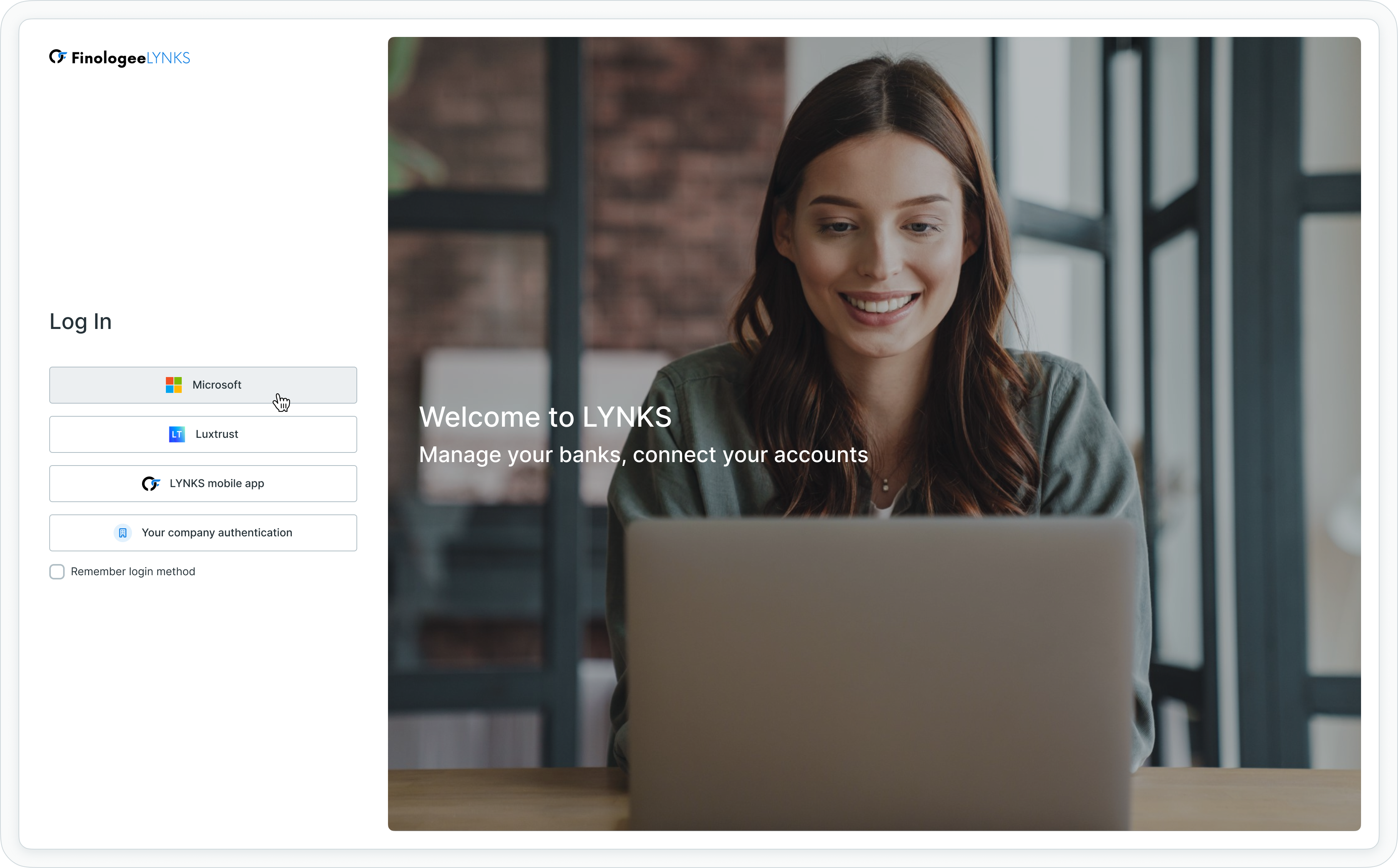
SSO login screen showing Microsoft authentication option
Token validation
LYNKS validates authentication tokens received from identity providers to ensure:
- Token authenticity and signature verification
- Token expiration and validity period
- User attribute mapping and identification
- Authorization scope and permissions
Signature capabilities
SSO provides simple electronic signatures for transaction authorization within LYNKS. As explained in Section 4.2 Digital Signatures, SSO-based signatures are simple electronic signatures under eIDAS, representing authenticated consent but providing minimal technical guarantees.
Simple electronic signatures
SSO-based signatures offer:
- Authentication-based consent - User identity verified through corporate SSO
- Audit trail - Complete logging of signature events
- User identity - Tied to authenticated user from identity provider
- Timestamp - Precise signature timestamp recording
Signature limitations
Organizations requiring higher levels of signature assurance should be aware:
- SSO signatures are simple electronic signatures under eIDAS (equivalent to a click after authentication)
- OAuth2 and SAMLv2 protocols do not define electronic signature mechanisms
- High-value transactions may require LuxTrust qualified signatures
- Regulatory requirements may mandate stronger signature methods
- Some industries require qualified electronic signatures for specific transaction types
Combined authentication strategies
Organizations can configure users with multiple authentication methods to balance convenience and security:
- SSO for login - Convenient daily access using corporate credentials
- LuxTrust for high-value signatures - Qualified signatures for payments above thresholds
- LYNKS mobile app for mobile signatures - Advanced signatures for mobile workflows
Configuration requirements
SSO authentication requires configuration at multiple levels to enable secure integration.
Tenant-level configuration
SSO must be enabled for your LYNKS tenant with the following settings:
- SSO authentication method enablement
- Identity provider endpoint configuration (one or multiple providers)
- OAuth2/SAMLv2 protocol selection per provider
- Redirect URL configuration for authentication callback
- Attribute mapping for user identification
- Provider branding and labeling for multiple providers
Identity provider setup
Your identity provider must be configured with:
- LYNKS application registration
- OAuth2 client credentials or SAML service provider configuration
- User attribute mapping (email, name, identifier)
- Authorization scope definition
- Callback URL whitelist including LYNKS URLs
User-level enablement
Users must be configured to use SSO authentication:
- SSO authentication method enabled in user profile
- User email address matching identity provider records
- Provider association (when multiple providers configured)
- No additional credentials required for SSO users
- Optional secondary authentication method for high-value signatures
Attribute mapping
LYNKS requires specific user attributes from the identity provider:
- Email address - Primary user identifier in LYNKS
- Full name - User display name (optional but recommended)
- Unique identifier - Stable user ID from identity provider
- Additional attributes - Custom attributes as needed
Sandbox testing
SSO configuration can be tested in LYNKS sandbox environments before production deployment, allowing organizations to validate identity provider integration and authentication flows without impacting production users.
Testing process
- Configure SSO in LYNKS sandbox tenant
- Set up identity provider with sandbox callback URLs
- Create test users in identity provider
- Test authentication flow end-to-end
- Verify user attribute mapping and permissions
- Test transaction signing with SSO signatures
- When multiple providers configured, test each provider independently
Common testing scenarios
- First-time user login with SSO
- Returning user login after session expiration
- User logout and re-authentication
- Transaction signing with SSO credentials
- Error handling for failed authentication
- Multiple tenant access with same SSO account
- Provider selection when multiple providers configured
multi-tenant configuration
Users with access to multiple tenants may have different authentication configurations for each tenant.
Per-tenant authentication
- Authentication methods are tenant-specific
- User can have SSO for Tenant A and LuxTrust for Tenant B
- Identity provider integration is configured per tenant
- Users switch tenants after initial authentication
Cross-tenant considerations
Organizations with multiple LYNKS tenants should consider:
- Consistent identity provider across tenants
- Centralized user provisioning strategies
- Cross-tenant access control policies
- Session management across tenant switches
Common questions
Answers to frequently asked questions about SSO authentication.
Getting started
What do I need to use SSO with LYNKS?
Your organization needs an identity provider that supports OAuth2 or SAMLv2 (such as Microsoft Azure AD, Google Workspace, or Okta), and your LYNKS administrator must configure the SSO integration with your identity provider's settings.
Can I use my existing corporate credentials?
Yes, that's the primary benefit of SSO. You'll use the same username and password you use for other corporate applications that are connected to your identity provider.
Do I need to remember a separate password for LYNKS?
No, you authenticate using your corporate identity provider credentials, which are managed by your IT department according to your organization's password policies.
Using SSO
What happens if I can't access my corporate account?
Contact your IT department or identity provider administrator, as LYNKS authentication relies on your corporate identity provider. Your administrator can also configure backup authentication methods for critical users.
Can I use SSO on mobile devices?
Yes, SSO works on mobile devices through the browser-based authentication flow. You'll be redirected to your identity provider's login page just as you would on a desktop.
Why do I see multiple SSO provider buttons?
Your tenant has multiple identity providers configured to support users from different organizations. Select the button corresponding to your organization's identity provider.
Security
Is SSO secure?
Yes, SSO uses industry-standard protocols (OAuth2 or SAMLv2) with encrypted token exchange. Security is enhanced when your identity provider enforces multi-factor authentication and strong password policies.
Can administrators see my corporate password?
No, your password never passes through LYNKS. You authenticate directly with your identity provider, which then provides LYNKS with a secure token confirming your identity.
What happens if my corporate account is compromised?
Your IT department can immediately disable your account at the identity provider level, which instantly prevents access to LYNKS and all other connected applications.
Best practices
Organizations should follow these best practices when implementing SSO authentication.
Security considerations
- Enable multi-factor authentication at identity provider level
- Implement conditional access policies for sensitive operations
- Regularly review user access and permissions
- Monitor authentication logs for suspicious activity
- Establish offboarding procedures to revoke access promptly
User experience
- Provide clear instructions for first-time SSO users
- Create guides for common usage scenarios
- Consider backup authentication methods for critical users
- Test authentication flow before broad deployment
- Communicate maintenance windows and identity provider changes
Integration management
- Document identity provider configuration settings
- Maintain staging and production environment separation
- Test configuration changes in sandbox first
- Keep identity provider contact information current
- Establish escalation procedures for authentication issues
- When using multiple providers, clearly label each provider button
Multiple provider management
- Document which users belong to which provider
- Establish clear naming conventions for provider labels
- Test all providers independently before production deployment
- Coordinate with all identity provider administrators for changes
- Maintain separate support contacts for each provider
Related documentation
Explore these related sections to learn more about authentication and security in LYNKS:
Core Concepts:
- Permissions - Comprehensive explanation of access control and role-based permissions - User access control and permission assignment
- Approvals - How approval workflows and signature processes function - Approval workflow concepts and signature requirements
Platform Features:
- User & Groups - User management and access configuration - User creation and SSO enablement
Security & Authentication:
- Authentication Methods - Detailed setup and usage of SSO, LuxTrust, and mobile app authentication - Overview of all authentication options
- LuxTrust - Qualified electronic signatures - Qualified electronic signatures for high-value transactions
- LYNKS Mobile App - Mobile authentication and push notifications - Mobile authentication alternative
- Digital Signatures - Transaction signing methods and legal validity - Transaction signing and signature validation
- Compliance & Audit - Security features, audit trails, and regulatory compliance - Security audit trails and compliance
Support
For assistance with SSO configuration, identity provider integration, or technical support, contact the LYNKS support team at [email protected].
SSO integration typically requires coordination between your IT department, identity provider administrators, and LYNKS support to ensure proper configuration and testing.
Updated 3 months ago