
Depositary approval
Extra approval workflow step for payments from investment accounts requiring depositary review and authorization
Introduction
Depositary approval is an additional workflow step required for credit transfers initiated from accounts flagged as investment accounts. This feature provides fund depositaries with oversight and control over payment processing, ensuring compliance with fund statutes and regulatory requirements.
When depositary approval is enabled for an account, all payments initiated from that account must be reviewed and approved by the appointed depositary before proceeding to bank submission. This additional layer of control supports depositaries in fulfilling their supervisory duties and maintaining proper fund governance.
For information about the complete payment approval workflow, see Payment Approvals - Payment approval concepts and workflows.
Prerequisites
Depositary approval functionality requires specific account flagging and depositary user configuration.
Account flagging
Accounts must be explicitly flagged as investment accounts to trigger the depositary approval workflow. This configuration is performed by LYNKS administrators during account setup or can be applied to existing accounts.
Depositary access
Appointed depositaries must have:
- User accounts with appropriate depositary role permissions
- Access to the specific investment accounts under their oversight
- Proper authentication methods configured
Feature enablement
Feature flag requiredThe depositary approval feature must be enabled for your tenant. Contact [email protected] to enable depositary workflows for your organization.
Depositary approval workflow
The depositary approval step integrates into the standard payment workflow between internal authorization completion and bank submission.
Standard payment workflow
For non-investment accounts, payments follow this workflow:
- Draft - Payment created
- Waiting for authorisation - Awaiting internal signatures
- Authorised - All required internal signatures obtained
- Sent to bank - Submitted for processing
Investment account workflow
For payments from investment accounts flagged for depositary oversight, an additional step is inserted after internal authorization:
- Draft - Payment created
- Waiting for authorisation - Awaiting internal signatures
- Authorised - All required internal signatures obtained
- Waiting for depositary authorisation - Awaiting depositary review ← Additional step
- Authorised or Rejected by depositary - Depositary decision
- Sent to bank - Submitted for processing (if approved)
This workflow ensures depositaries can review all internally authorized payments before they are submitted to the bank, providing the necessary oversight for fund governance and regulatory compliance.
Depositary view and interface
Depositaries access LYNKS with a specialized view focused on their oversight responsibilities. This dedicated interface displays only payments and information relevant to their role as depositary.
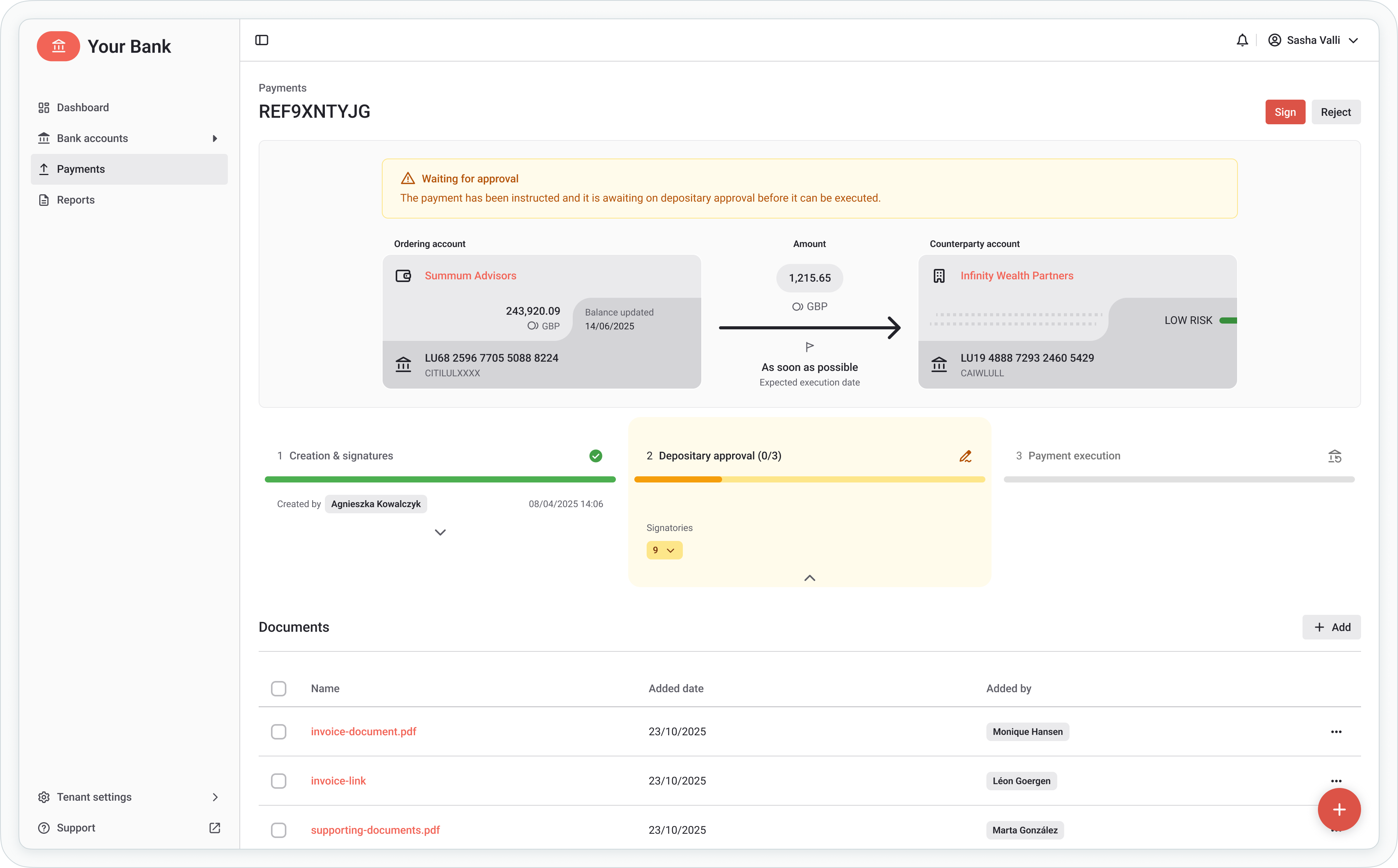
Depositary view showing payments requiring approval
The depositary interface includes:
Pending depositary approvals
All payments that have reached the "Depositary approval" status and require depositary review. Each entry displays:
- Payment details (amount, currency, counterparty)
- Ordering party account
- Payment category
- Attached documentation
- Authorization history
Executed payments
Complete history of payments that have been approved and processed, supporting cashflow monitoring duties and audit requirements.

Depositary filtered view with cashflow monitoring capabilities
Transaction history
Access to account transaction history for cashflow monitoring, reconciliation, and oversight activities.
Approval rules and decision making
Depositaries define payment approval rules in accordance with fund statutes and regulatory requirements. These rules guide decision-making for payment review and authorization.
Approval criteria
Depositaries configure approval rules based on:
- Payment amount thresholds - Automatic approval limits or enhanced review requirements
- Counterparty restrictions - Approved beneficiary lists or prohibited destinations
- Payment categories - Permitted payment types and restrictions
- Documentation requirements - Required supporting documents for specific payment types
Decision options
When reviewing payments, depositaries can:
Approve payments
Authorize the payment to proceed to bank submission. Approved payments move to "Sent to bank" status and are submitted according to the configured submission schedule.
Reject payments
Reject payments that do not meet fund requirements or compliance standards. Rejected payments cannot proceed and the payment creator is notified of the rejection.
Request changes
Request modifications to payment details before approval. This option allows depositaries to work with payment creators to address issues without outright rejection. Changed payments are resubmitted for depositary approval after modification.
Supporting documentation
All documents attached to payments submitted for depositary approval are accessible to depositaries for their review.
Document access
Depositaries can:
- View all attached documents and supporting materials
- Download documents for detailed review
- Reference documents when making approval decisions
Required documentation
Fund administrators and payment creators should ensure payments include all required supporting documentation before submission to depositary approval, facilitating efficient review and decision-making.
For information about attaching documents to payments, see Credit Transfers - Review payment details before approval.
Permissions
Depositary functions require specific permissions to access the depositary interface and perform approval actions.
| Permission | Description |
|---|---|
PAYMENT_READ | View payments and payment details in depositary view |
PAYMENT_AUTHORISE | Approve or reject payments as depositary |
Depositary role configurationDepositary permissions are typically configured as part of a dedicated depositary role with restricted access to only depositary-relevant functions. Contact your administrator to configure depositary access.
For comprehensive permission system details, see Permissions - Comprehensive explanation of access control and role-based permissions.
Related documentation
Explore related sections for more information:
Payment Features:
- Credit Transfers - Review payment details before approval - Creating and managing credit transfers
- Payment Approvals - Payment approval concepts and workflows - Understanding payment approval workflows
- Action Center - Centralized task and approval management - Managing pending approvals
Configuration:
- Signatory Rules - Approval workflow configuration - Configuring approval workflows
- Permissions - Comprehensive explanation of access control and role-based permissions - Permission management and access control
- Tenant Settings - Administrative configuration for users, accounts, and rules - Account flagging and user configuration
Compliance:
- Compliance & Audit - Security features, audit trails, and regulatory compliance - Audit trails and compliance features
- Digital Signatures - Transaction signing methods and legal validity - Transaction authorization and signatures
Support
For assistance with credit transfers or questions about payment processing, contact [email protected].
Updated 2 months ago