
Cash Concentration
Automate cash pooling and sweeping between accounts based on balance thresholds and scheduling rules
Introduction
The Cash Concentration feature enables automated movement of funds between accounts to optimize liquidity management. Organizations can configure rules that automatically sweep excess cash to master accounts, maintain target balances, and fund accounts when balances fall below defined thresholds — all without manual intervention.
Cash concentration supports various liquidity management strategies including zero-balance pooling where subsidiary accounts are swept completely, and custom-balance automation where accounts maintain specific target levels. The feature operates across multiple banks and currencies, providing a unified approach to treasury optimization regardless of where accounts are held.
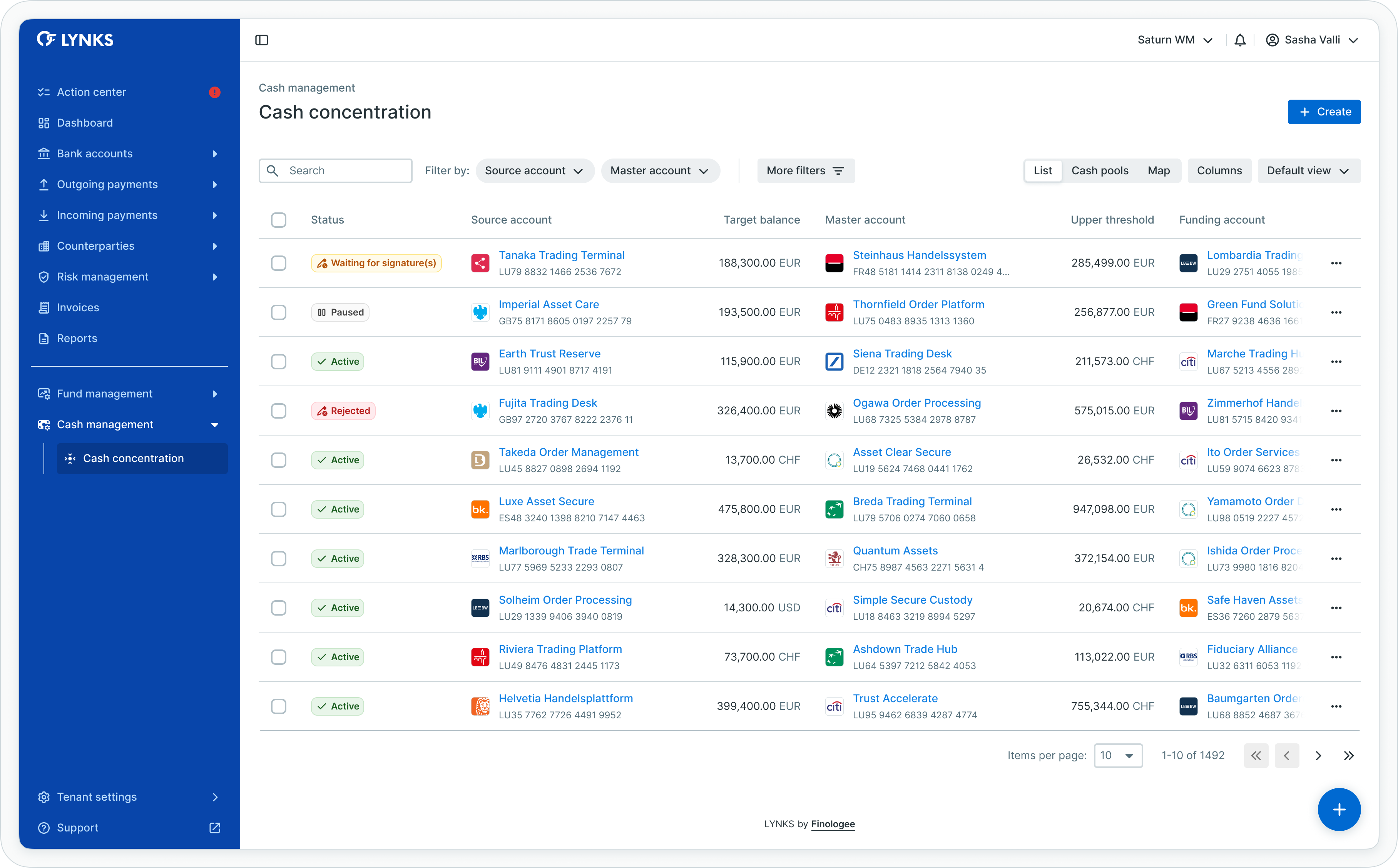
Cash concentration rules list view
Prerequisites
Users must have the appropriate permissions and the Cash Concentration feature flag enabled for their tenant.
Permissions
| Permission | Description |
|---|---|
CASH_CONCENTRATION_READ | View cash concentration automation rules and their status |
CASH_CONCENTRATION_DRAFT | Create, edit, and cancel draft automation rules |
CASH_CONCENTRATION_WRITE | Create rules and submit for authorization |
CASH_CONCENTRATION_SIGN | Authorize, activate, and reject automation rules |
Account scopingCash concentration permissions are scoped to ordering party accounts. Users can only create or view rules for accounts they have access to.
Feature flags
Feature flag requiredThis feature requires the CASH_CONCENTRATION tenant flag to be enabled. Contact [email protected] to enable cash concentration for your tenant.
Cash concentration overview
Cash concentration automates the transfer of funds between your accounts based on defined criteria. Each automation rule specifies source accounts, destination accounts, balance thresholds, and execution schedules. When conditions are met, the system automatically creates and executes credit transfers without manual intervention.
Key components
| Component | Description |
|---|---|
| Source account | Account from which funds are swept based on the rule's criteria |
| Master account | Destination account where swept funds are concentrated |
| Funding account | Optional account that funds the source when its balance falls below threshold |
| Target balance | Ideal balance the source account should maintain after sweeping or funding |
| Thresholds | Upper and lower balance limits that trigger automated transfers |
| Frequency | Schedule at which account balances are evaluated against thresholds |
Use cases
Cash concentration addresses several liquidity management scenarios:
| Use case | Description |
|---|---|
| Investment optimization | Fund administrators consolidate excess cash to maximize investment opportunities in money market funds or interest-bearing accounts |
| Corporate pooling | Subsidiaries sweep cash to headquarters accounts for centralized operations, salary payments, or intercompany loans |
| Minimum balance maintenance | Accounts are automatically funded when balances fall below required levels, avoiding costly external borrowing |
Viewing cash concentration rules
Cash concentration automations can be viewed from three different perspectives, each providing unique insights into your automated cash flows.
List view
The list view displays all automation rules in a table format with key information including source accounts, master accounts, status, frequency, and last execution details. As shown in the overview image above, users can sort and filter rules to focus on specific automations.
Cash pools view
The cash pools view groups automations by their master account, showing which accounts sweep funds to each concentration target. Expand and collapse cash pools to see all source accounts sweeping to a specific master account.
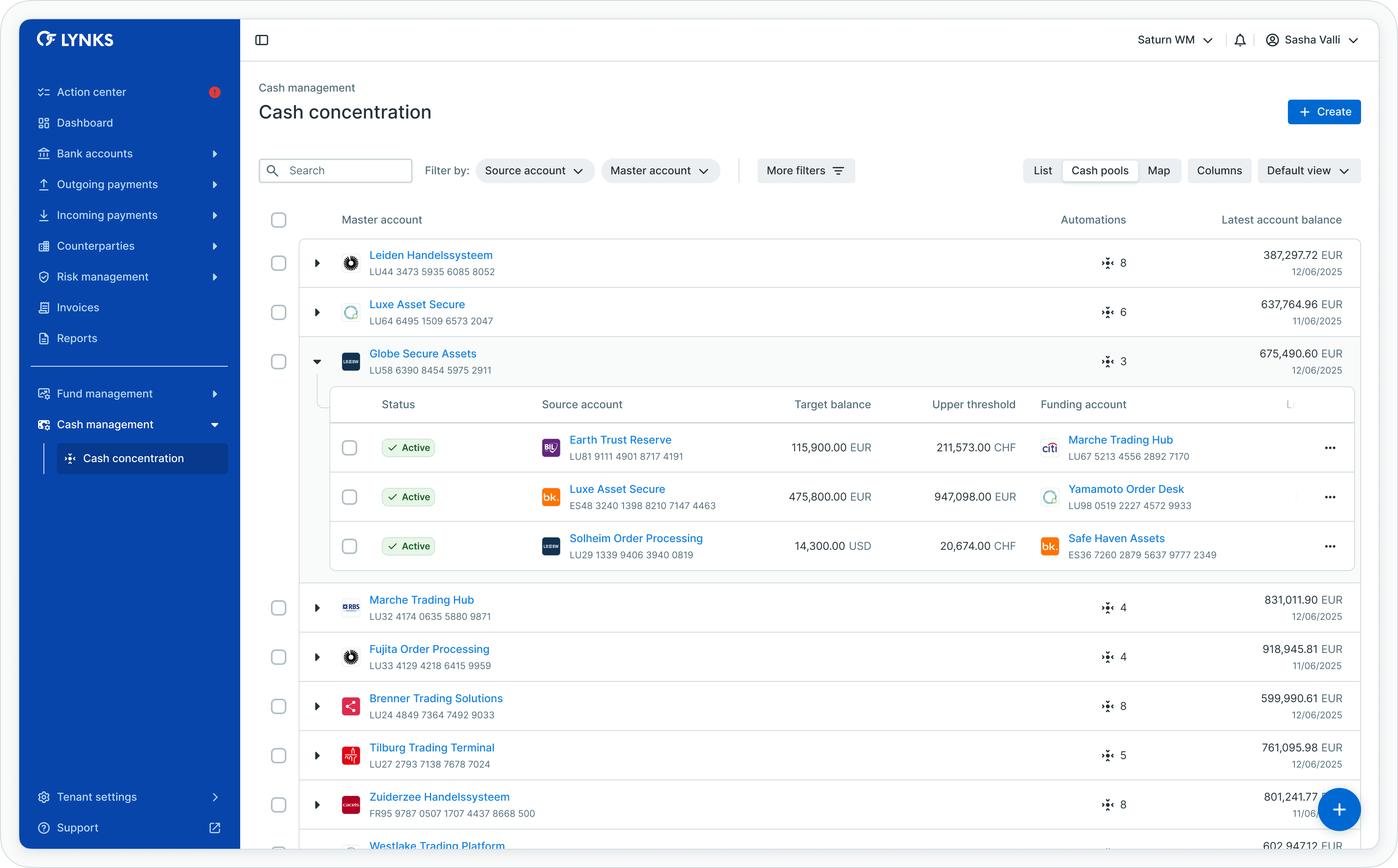
Cash pools view with grouped automations
Map view
The interactive map provides a visual representation of all automated cash flows, displaying the relationships between source, master, and funding accounts across your account structure.
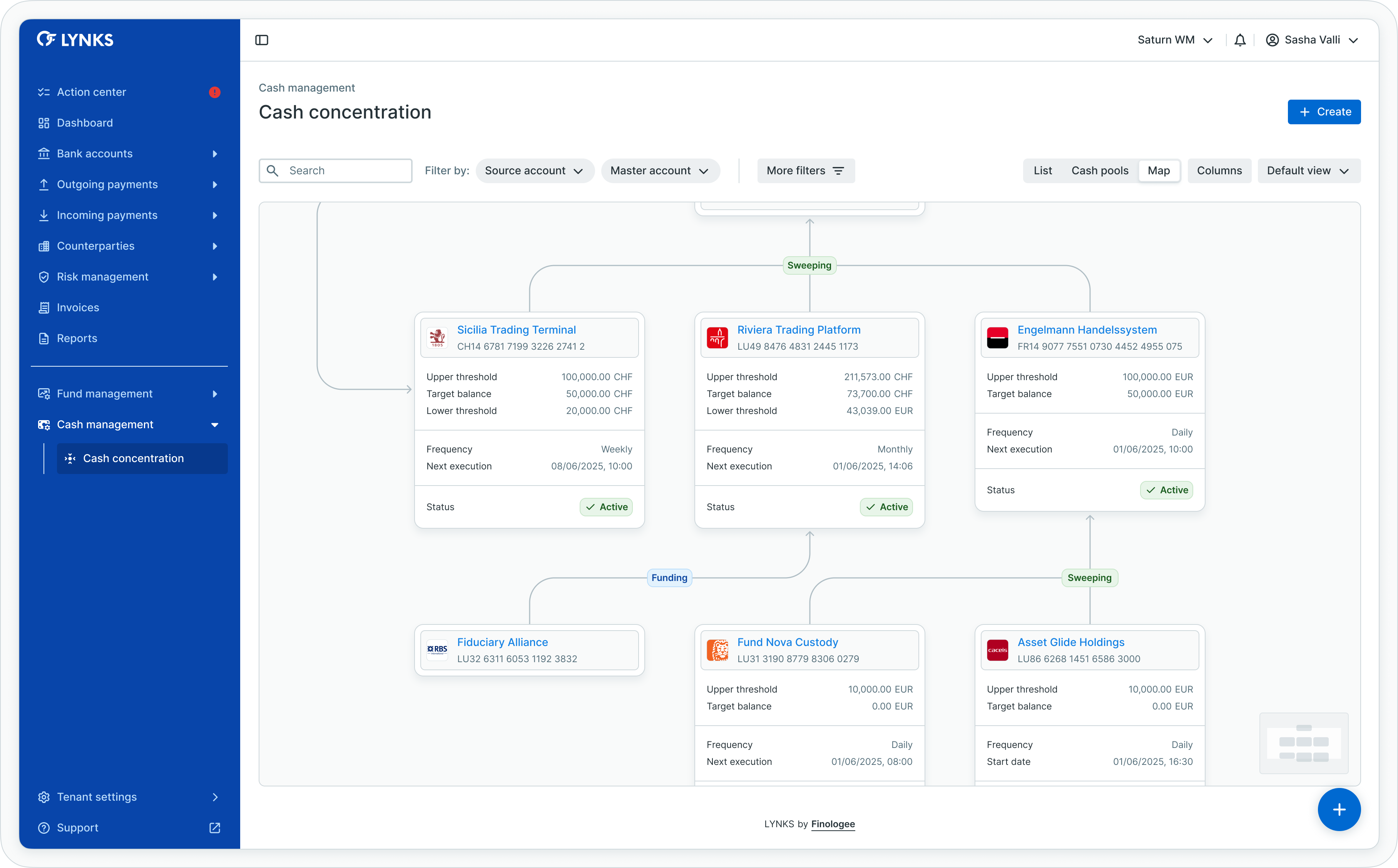
Interactive map showing cash flow relationships
Time zone displayIn all views, execution times are displayed in your default time zone, regardless of the time zone configured for individual rules.
Creating cash concentration rules
To create a new cash concentration rule, navigate to Cash Management > Cash Concentration and click New rule or the floating action button.
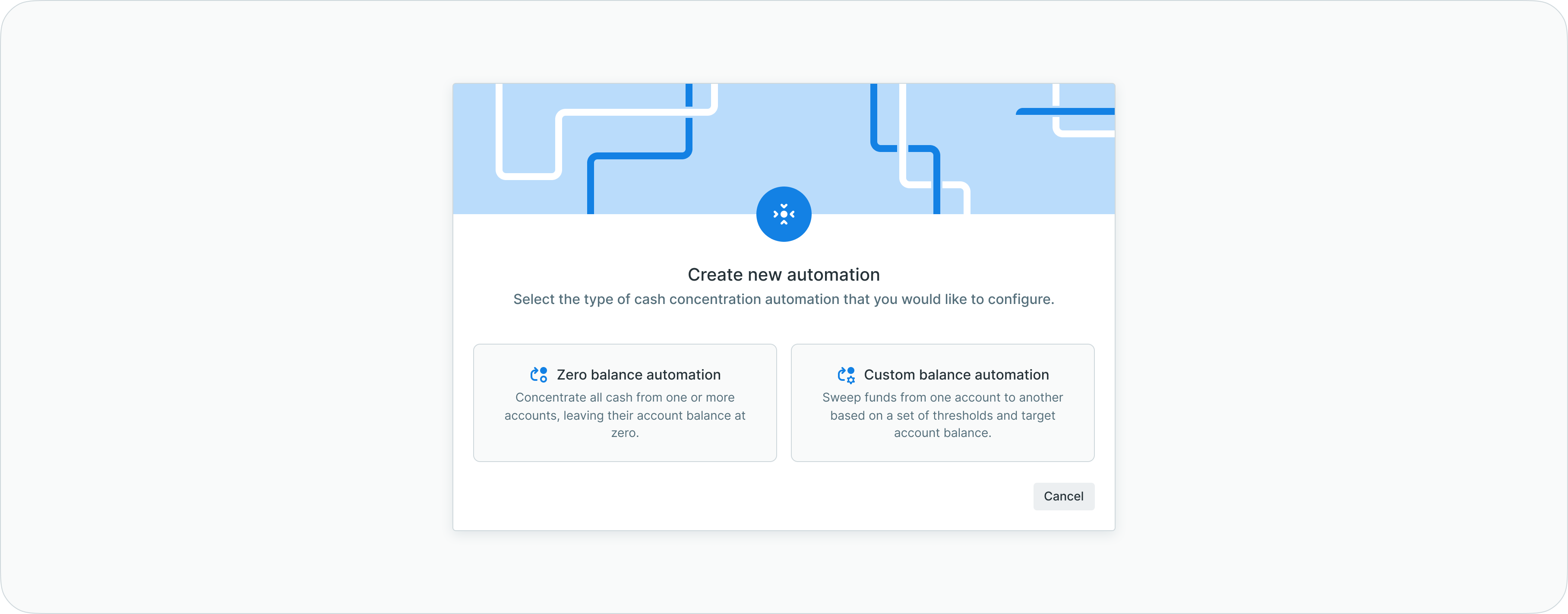
Creating a new cash concentration rule
LYNKS supports two automation types: zero balance and custom balance.
Zero balance automation
Zero balance automation sweeps source account balances completely to the master account, ideal for cash pooling structures where subsidiary accounts should not hold overnight balances.
To create a zero balance rule:
- Select Zero balance automation as the rule type
- Choose one or more source accounts from which to sweep funds
- Select the master account where funds will be concentrated
- Define the frequency (daily, weekly, monthly) for balance evaluation
- Set the start date, time, and time zone for rule execution
- Review the configuration and submit for authorization
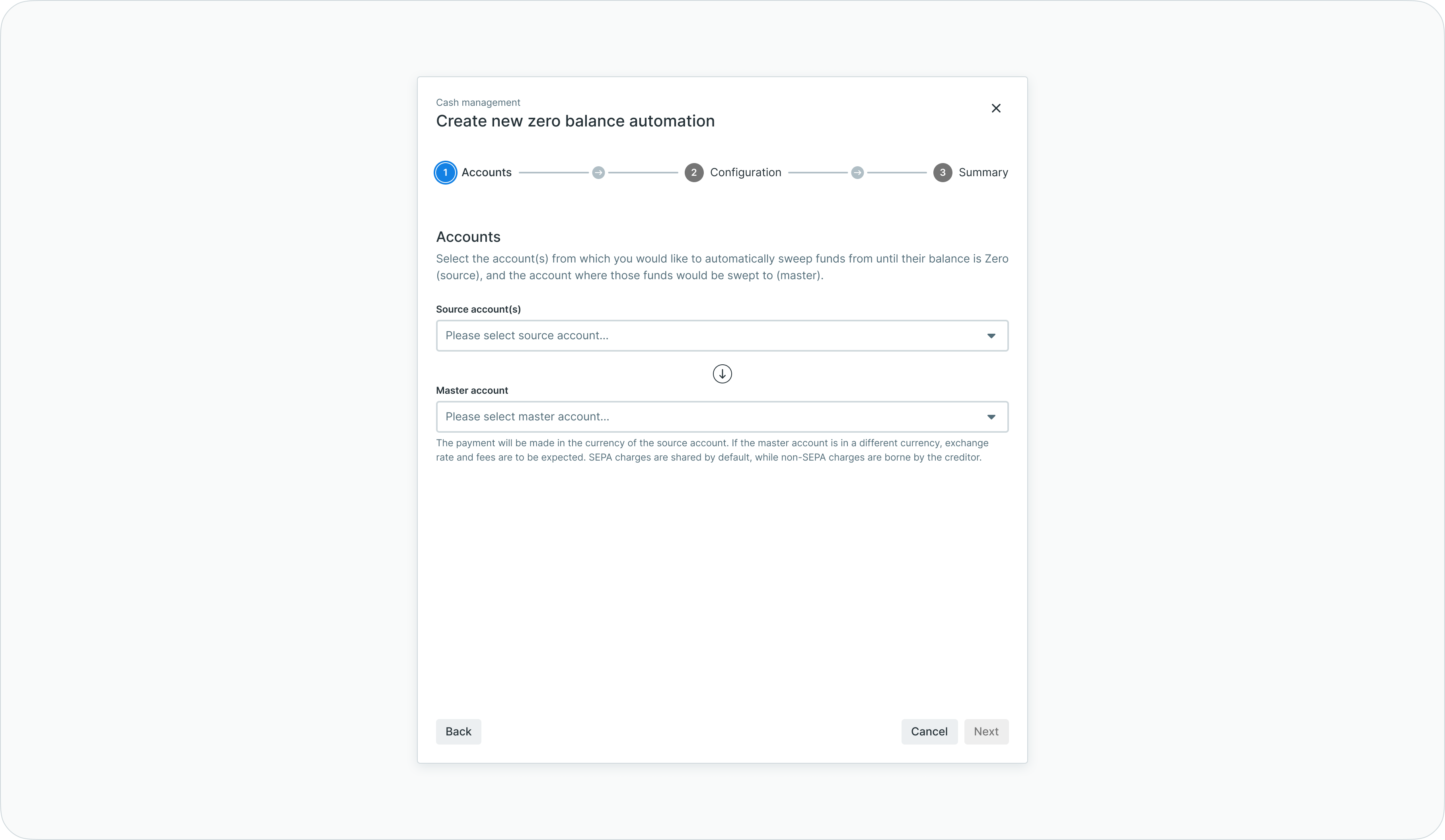
Zero balance automation - account selection
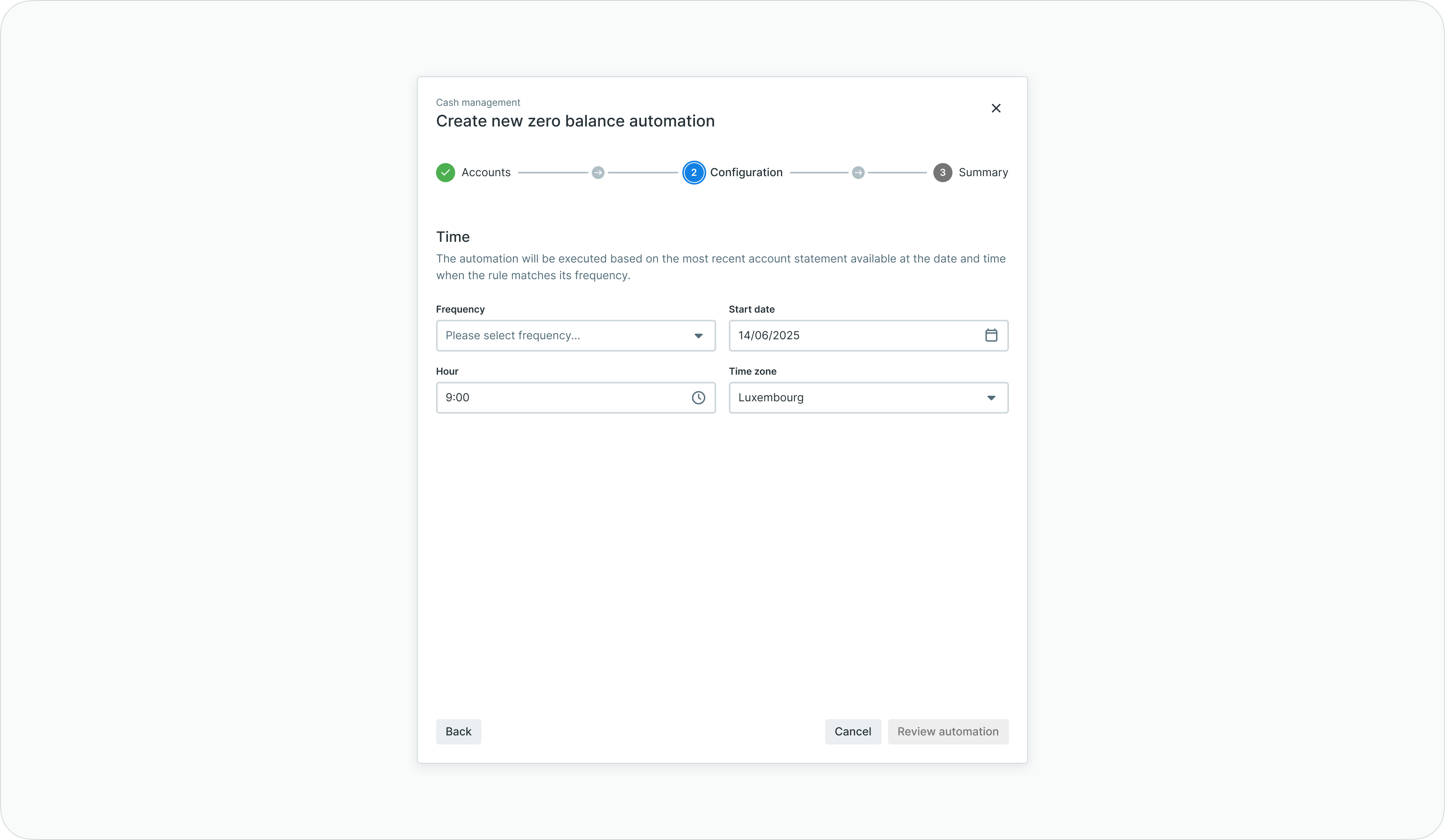
Zero balance automation - schedule configuration
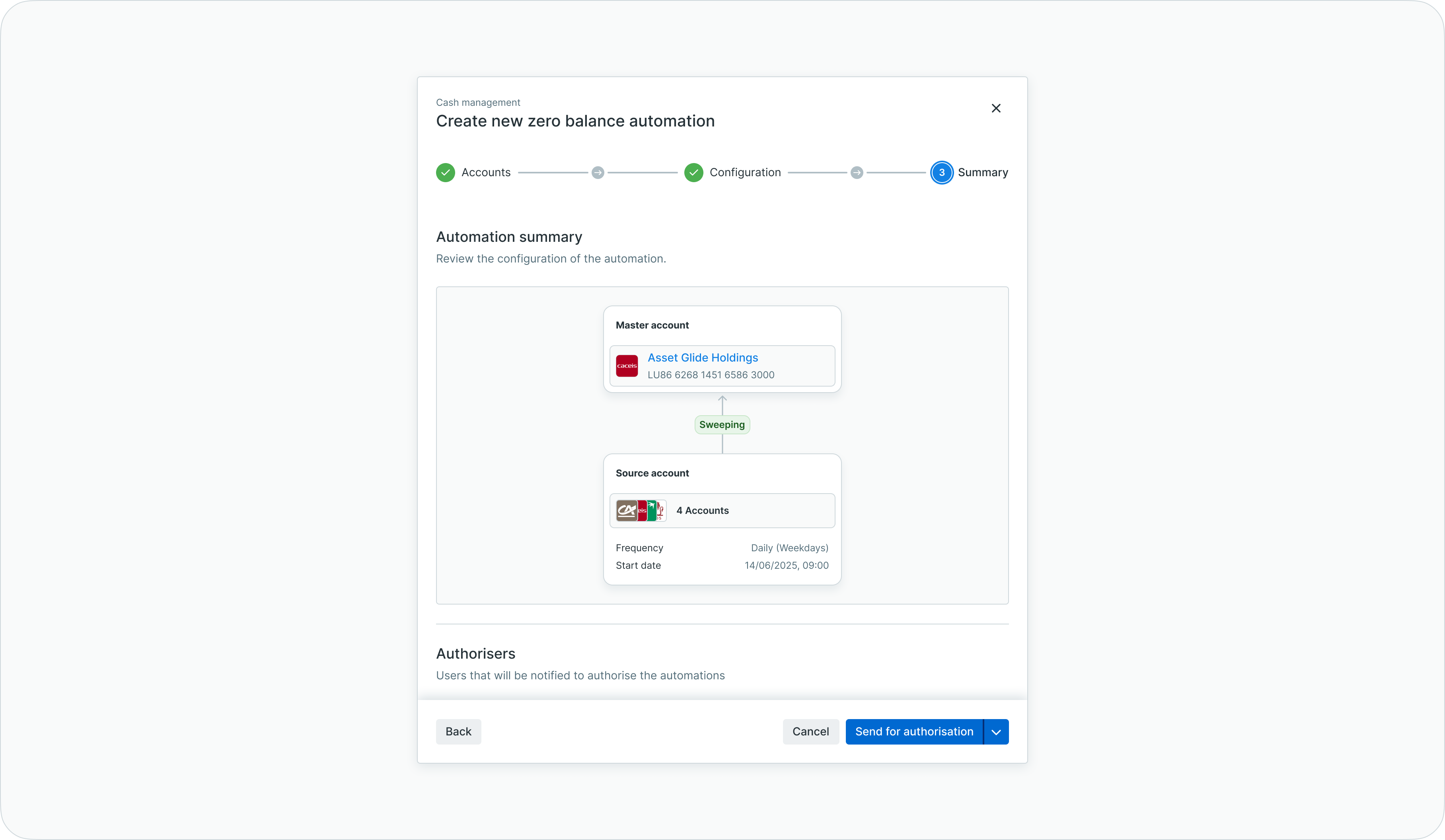
Zero balance automation - review before submission
Multiple source accounts can be selected for a single zero balance rule, enabling efficient setup of cash pooling structures.
Custom balance automation
Custom balance automation transfers funds based on configurable thresholds, maintaining target balances in source accounts while sweeping excess to master accounts or funding shortfalls from funding accounts.
To create a custom balance rule:
- Select Custom balance automation as the rule type
- Choose the source account to monitor
- Select the master account for excess fund sweeping
- Optionally enable Automate source account funding and select a funding account
- Configure balance thresholds:
- Upper threshold: Balance above which funds are swept to the master account
- Lower threshold: Balance below which the source account is funded
- Target balance: Balance to maintain after sweeping or funding operations
- Define the frequency and start date for rule execution
- Review and submit for authorization

Custom balance automation - account and threshold configuration
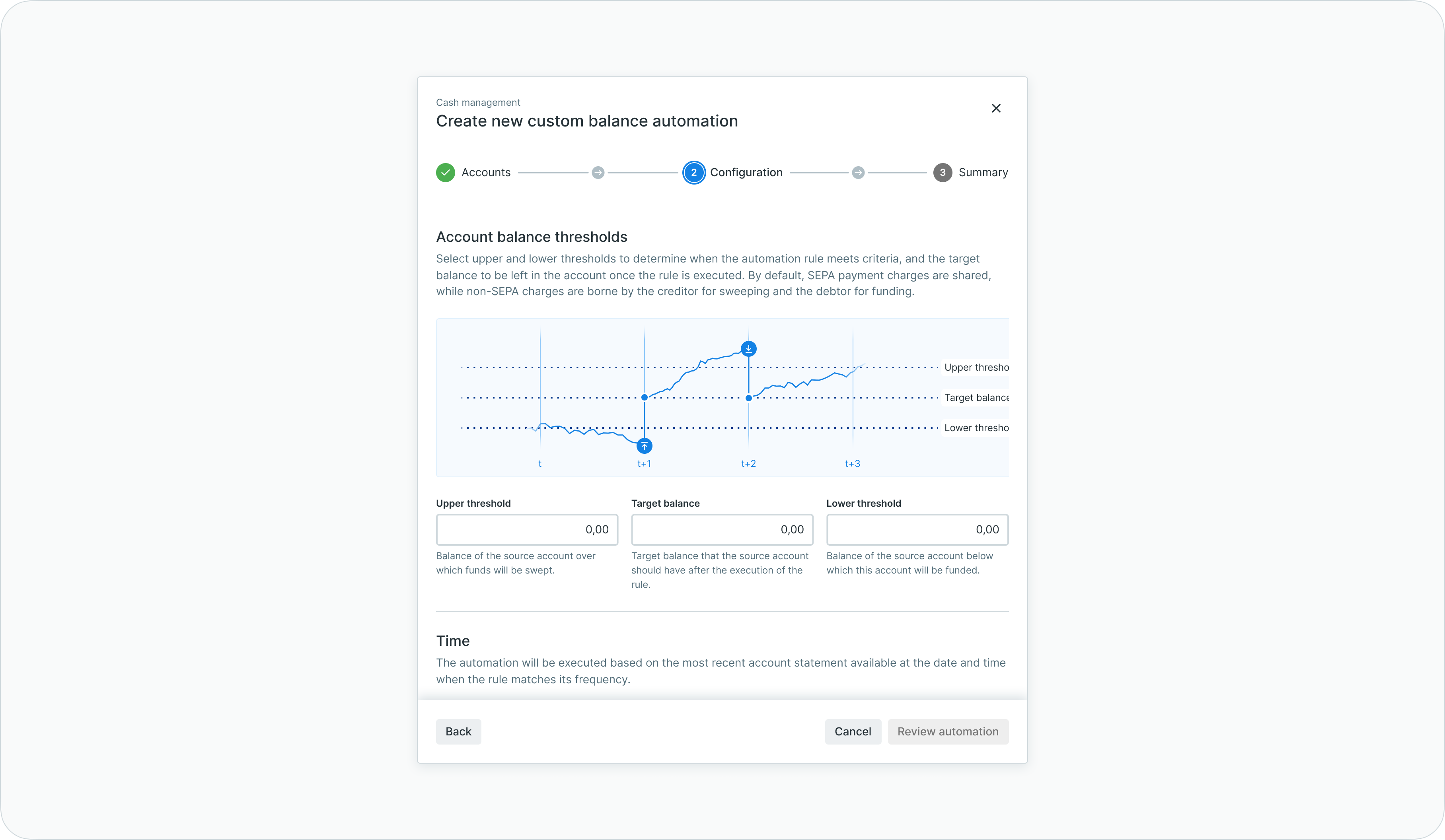
Custom balance automation - schedule configuration
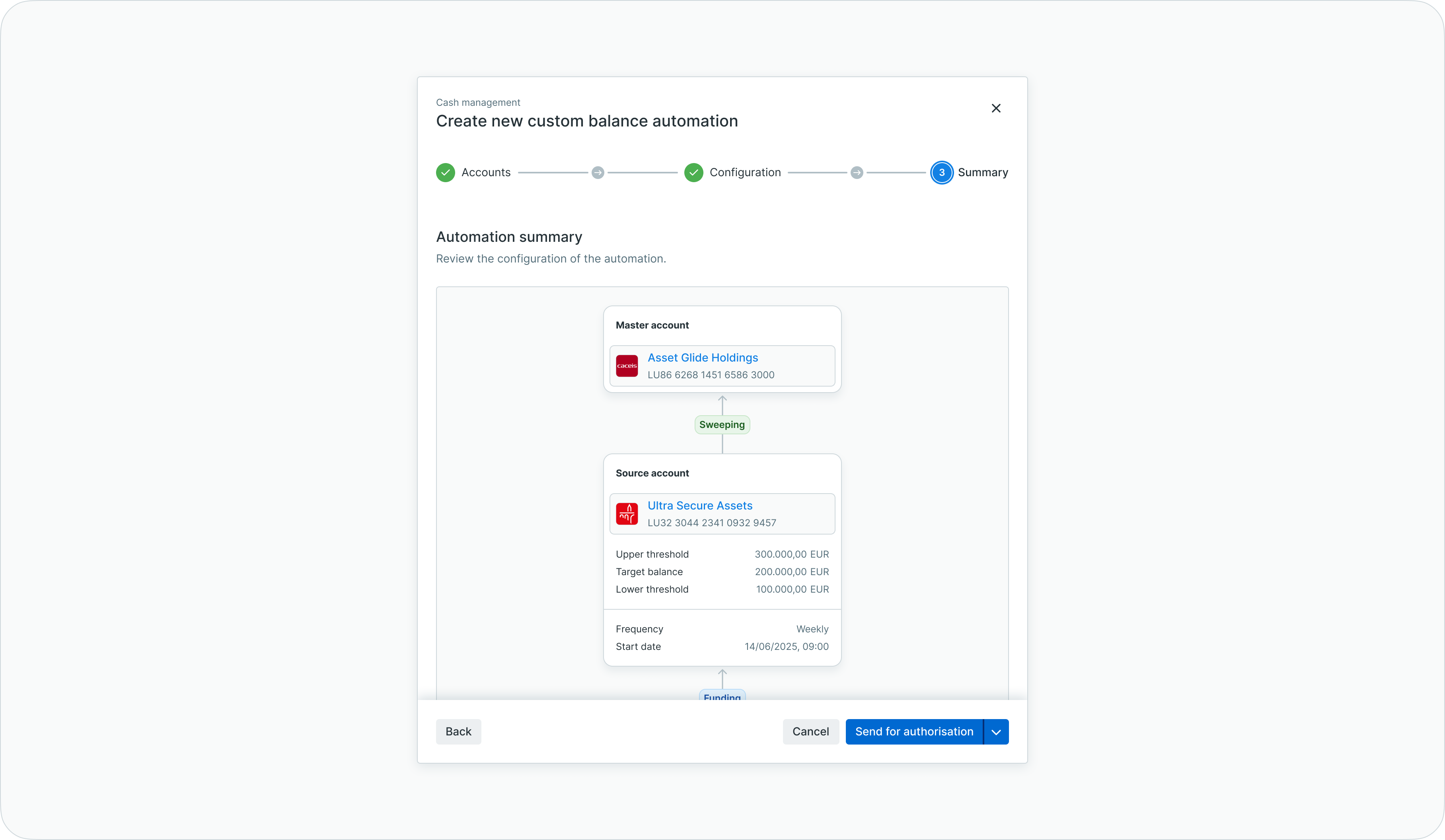
Custom balance automation - review before submission
Account eligibilityOnly active ordering party accounts can participate in cash concentration automations. Inactive or closed accounts cannot be selected as source, master, or funding accounts.
Rule details and monitoring
Clicking on an existing cash concentration rule opens the detail view, providing comprehensive information about the automation and its execution history.
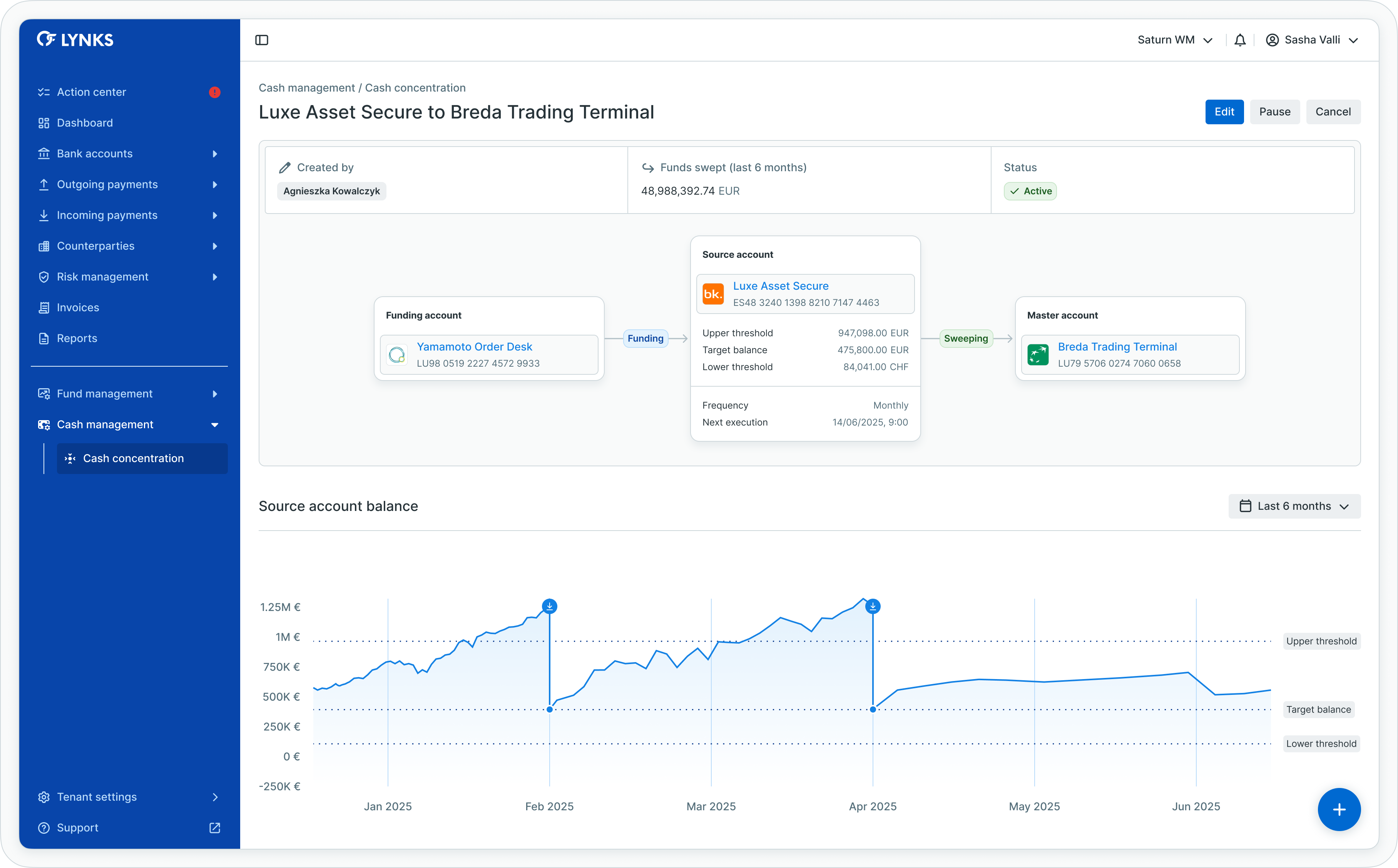
Cash concentration rule detail view
Information displayed
The detail view includes:
| Section | Description |
|---|---|
| Rule configuration | Source, master, and funding accounts with threshold settings |
| Creator | User who created the rule and creation timestamp |
| Last sweep amount | Most recent amount transferred to the master account |
| Current status | Active, paused, waiting for authorization, or cancelled |
| Transaction history | All payments initiated by the rule with balance impact |
| Action log | Complete history of manual and automated actions |
Action log
The action log provides an audit trail of all activities related to the rule, including:
- Rule creation and modifications
- Authorization events
- Automated sweep and funding transactions
- Manual pauses and reactivations
- Status changes
The action log can be downloaded for compliance and audit purposes.
Editing automation rules
Cash concentration rules can be modified to adjust thresholds, frequencies, or account assignments, with the exception of the source account which cannot be changed after rule creation.
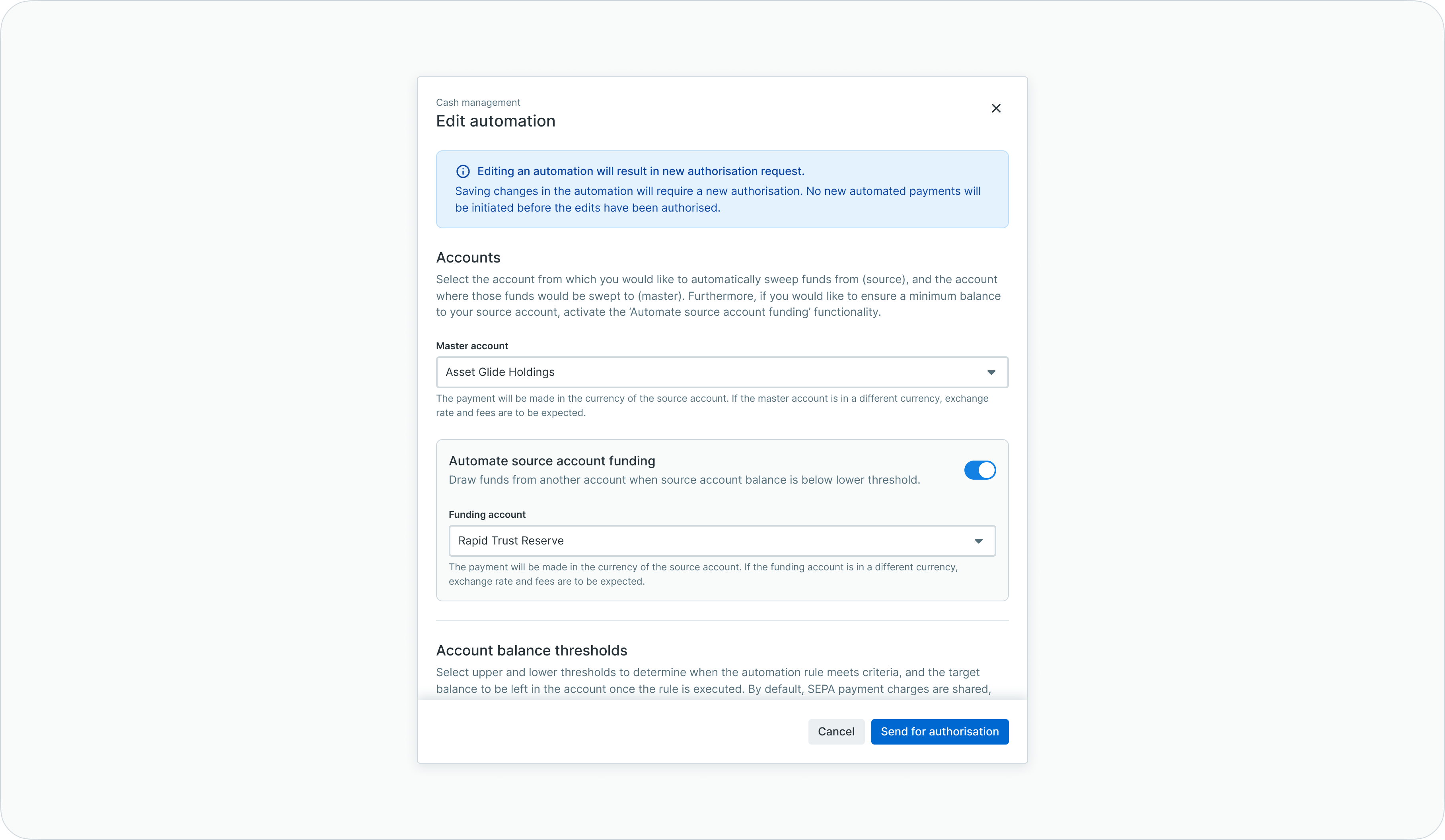
Editing a cash concentration rule
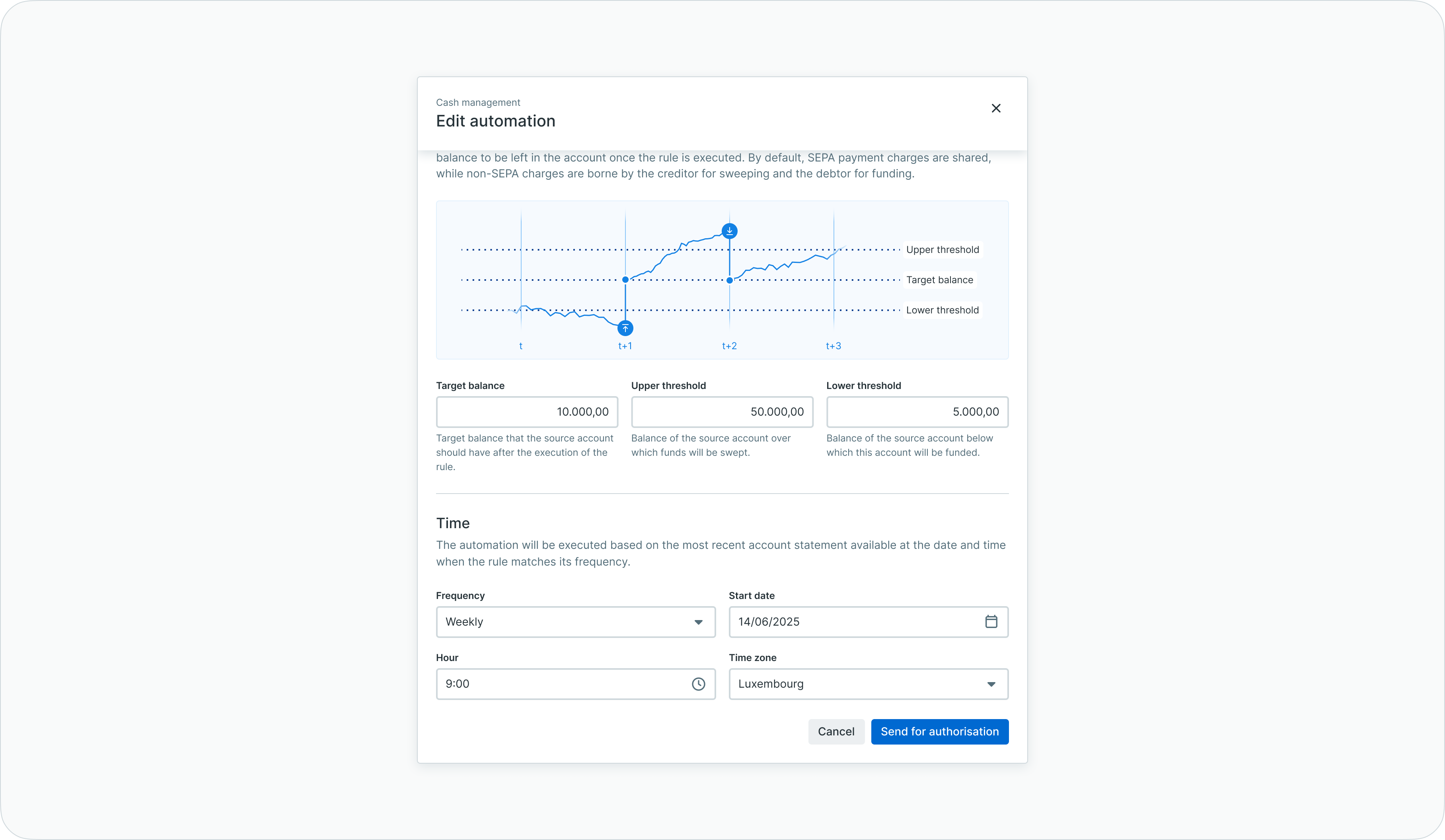
Editing a cash concentration rule - scrolled view
To edit an existing rule:
- Open the rule detail view
- Click Edit to enter modification mode
- Adjust the desired parameters
- Save changes and submit for re-authorization
Authorization requiredChanges to cash concentration rules require new authorization before taking effect. The rule is automatically paused when edits are saved, and no automated payments are initiated until the changes are authorized.
Changing source accounts
If the source account needs to be changed, a new cash concentration rule must be created. The existing rule can be cancelled once the new rule is active.
Status definitions
Cash concentration rules progress through defined statuses during their lifecycle.
| Status | Description |
|---|---|
| Draft | Rule created but not yet submitted for authorization |
| Waiting for authorization | Rule submitted and awaiting approval from authorized signatories |
| Active | Rule authorized and executing according to schedule |
| Paused | Rule temporarily suspended; no automated payments initiated |
| Cancelled | Rule permanently stopped; historical data retained |
Status transitions
| From | To | Trigger |
|---|---|---|
| Draft | Waiting for authorization | User submits rule for approval |
| Waiting for authorization | Active | Authorized signatories approve the rule |
| Waiting for authorization | Draft | Rule rejected or returned for modification |
| Active | Paused | User manually pauses the rule or edits are saved |
| Paused | Active | User reactivates the rule or edits are authorized |
| Active / Paused | Cancelled | User cancels the rule (terminal status) |
Multi-currency support
Cash concentration operates across accounts in different currencies, with automatic handling of foreign exchange when source and master accounts are denominated in different currencies.
FX transactions
When a cash concentration rule initiates a transfer between accounts in different currencies:
- The payment is made in the currency of the source account
- Exchange rates and fees apply according to bank processing
- The converted amount is credited to the master account
Payment charges
Charge handling varies based on transaction type:
| Transaction type | Charge bearer |
|---|---|
| SEPA-compliant | SHA (shared) or SLEV regardless of direction |
| Non-SEPA sweeping | BEN or CRED (beneficiary/creditor bears charges) |
| Non-SEPA funding | OUR or DEBT (ordering party/debtor bears charges) |
Exchange rate visibilityFor cross-currency transactions, the applied exchange rate and any fees are visible in the transaction details after execution.
Automated execution
Cash concentration rules execute automatically according to their configured schedules, evaluating account balances and initiating transfers when threshold conditions are met.
Execution workflow
- At the scheduled frequency, the system retrieves the source account's closing balance from the most recent bank statement
- The balance is evaluated against configured thresholds:
- If above upper threshold: sweep excess to master account
- If below lower threshold: fund from funding account (if configured)
- Credit transfers are automatically created with the "Cash Concentration" payment category
- Transactions are auto-signed using LYNKS system credentials
- Payments are submitted to the bank for execution
- Results are logged in the rule's action history
Transaction communication
Automatically generated transactions include a standardized communication field: "Credit transfer created from Cash Concentration rule [ID] created on [date]" for clear identification and reconciliation.
Execution timing
Rules evaluate account balances based on bank statement data. The automation executes after statements are received and processed, typically on the next business day following the scheduled evaluation date.
Business days onlyCash concentration rules execute only on business days. Rules scheduled for weekends or holidays execute on the next available business day.
Best practices
Follow these recommendations for effective cash concentration management:
- Start with clear objectives — Define your liquidity management goals before configuring rules, whether maximizing investment returns, centralizing operations, or maintaining minimum balances
- Test with conservative thresholds — Begin with wider threshold ranges and adjust based on observed behavior before tightening parameters
- Monitor initial executions — Review the first several automated transactions to verify rules behave as expected
- Coordinate with signatory rules — Ensure your signatory matrix covers cash concentration transactions to avoid execution failures
- Use appropriate frequencies — Match evaluation frequency to your operational needs; daily for active treasury management, weekly or monthly for stable structures
- Document rule purposes — Maintain records of why each rule was created to support audit requirements and successor understanding
- Review inactive rules — Periodically review paused or draft rules and either activate or cancel them to maintain a clean rule set
Related documentation
Explore related sections for more information:
- Approvals - How approval workflows and signature processes function - Understanding authorization workflows for automation rules
- Bank Accounts - Account management, balance monitoring, and transaction history - Account balances and transaction history
- Outgoing Payments - Creating and managing credit transfers and standing orders - Credit transfer details and status tracking
- Signatory Rules - Approval workflow configuration - Configuring auto-approval for cash concentration transactions
- Transaction Currencies - Multi-currency handling and exchange rates - Multi-currency handling and exchange rates
Support
For assistance with cash concentration configuration, to enable the feature for your tenant, or to discuss implementation requirements, contact [email protected].
Updated 3 months ago