
Invoices
Send and receive electronic invoices through the Peppol network with payment reconciliation
Introduction
Within the Invoices section, users have access to a collection of invoices sent and received through the Peppol network. The LYNKS Peppol module enables electronic document exchange with government entities, public institutions, and other businesses connected to the Peppol network.
The Peppol module deployment on LYNKS enables tight integration with the platform's core payment features. Outgoing and incoming e-invoices sent over the Peppol network can be mapped with corresponding payments, allowing monitoring and reconciliation of payment processes to be fully automated.
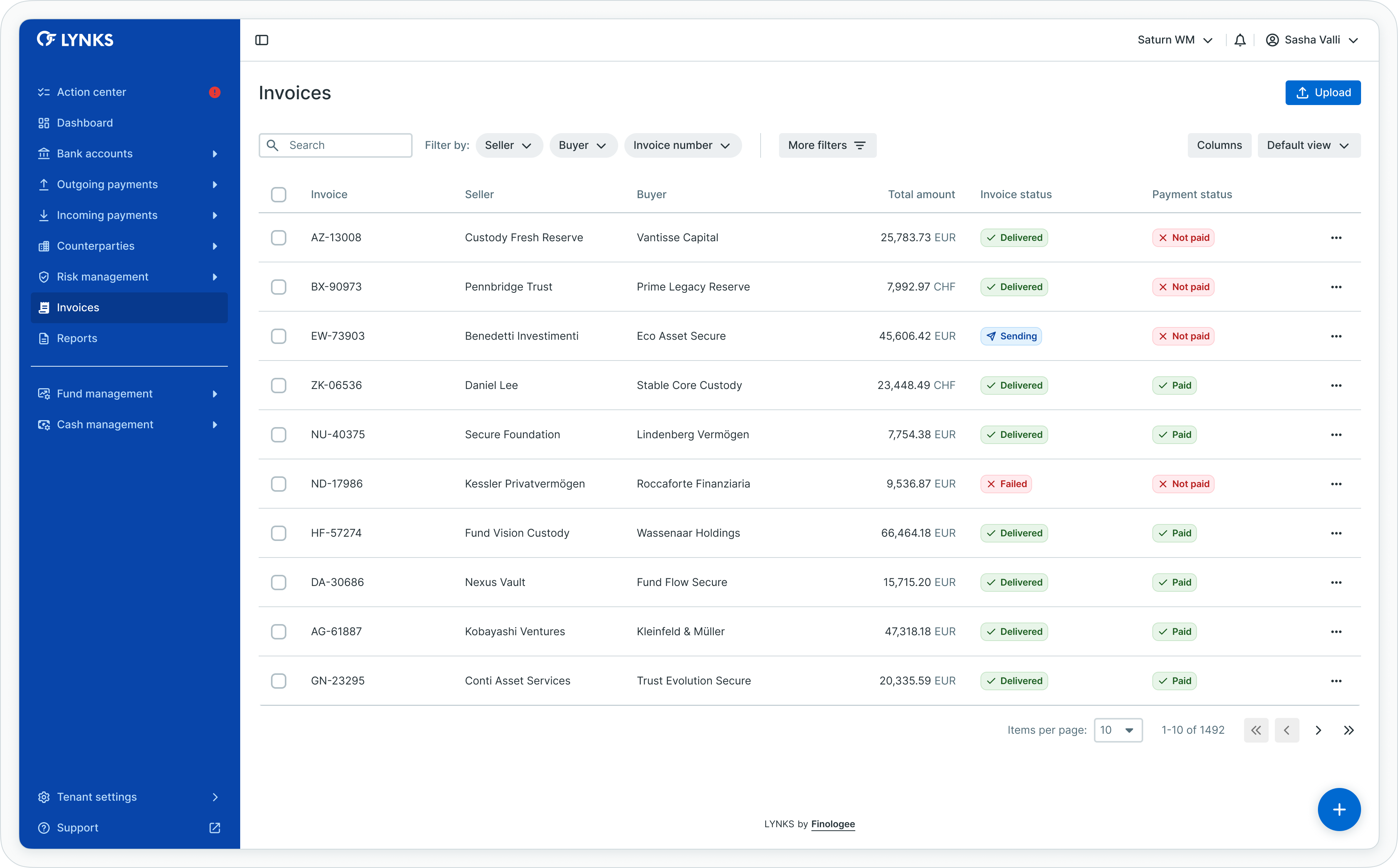
Invoices list view
Prerequisites
Users must have the appropriate permissions to access invoice functionality. The Invoices feature requires tenant-level configuration and Peppol access point integration.
Permissions
| Permission | Description |
|---|---|
INVOICE_READ | View invoices, invoice details, and status information |
INVOICE_WRITE | Create and upload invoices, manage invoice data |
Peppol integration requiredInvoice functionality requires Peppol access point configuration for your tenant. Contact [email protected] to enable e-invoicing capabilities.
Peppol integration and standards
LYNKS provides a Peppol access point operated in a Software-as-a-Service (SaaS) mode, enabling users to exchange electronic documents with any participant in the Peppol network worldwide.
What is Peppol?
Peppol is the common delivery network chosen to enable the automated issuing, transmission, and receipt of electronic invoices. Managed by the nonprofit organization OpenPeppol, Peppol provides standardized document exchange across Europe and globally.
Finologee is a certified Peppol Service Provider for eDelivery and Post-Award services, having passed official OpenPeppol certification procedures.
Supported document types
The LYNKS Peppol module supports exchange of:
| Document type | Description |
|---|---|
| Invoices | Standard electronic invoices in UBL format |
| Credit notes | Corrections or adjustments to previously issued invoices |
Document format
All documents exchanged through Peppol use the Universal Business Language (UBL) format, specifically the Peppol BIS Billing 3.0 specification. This standardized format ensures interoperability across the Peppol network.
Routing capabilities
The LYNKS Peppol access point enables:
- Business-to-Government (B2G) - Send invoices to government entities, public institutions, and municipalities
- Business-to-Business (B2B) - Exchange invoices with other businesses connected to the Peppol network
- Business-to-Consumer (B2C) - Send invoices to consumers where supported
Invoice lifecycle management
The Invoices section provides tools for managing the complete invoice lifecycle from creation through delivery and reconciliation.
Invoices list
The invoices list displays all electronic invoices with key information:
- Invoice number
- Seller and buyer information
- Invoice date and due date
- Total amount (with VAT)
- Invoice status
- Payment status
Creating and uploading invoices
To upload a new invoice:
- Navigate to the Invoices section from the main menu
- Click the Upload invoice button on the right-hand side
- Select or drop the invoice file
- The system validates the invoice against UBL specifications
- Valid invoices are queued for delivery to the Peppol network
Input methods
LYNKS supports multiple methods for submitting invoices:
| Method | Description |
|---|---|
| Web interface | Upload invoice files directly through the LYNKS interface |
| API | Submit invoices programmatically via the LYNKS REST API |
| SFTP | Upload UBL files to designated SFTP folders for automated processing |
Invoice validation
When an invoice is submitted, LYNKS performs validation against UBL specifications and Peppol requirements. Invoices that fail validation are moved to an error state with detailed error reports indicating the specific issues.
Invoice statuses
| Status | Description |
|---|---|
| Received | Invoice received and validated, pending delivery to Peppol network |
| Sent | Invoice successfully delivered through the Peppol network |
| Error | Invoice delivery failed or validation errors occurred |
Tracking delivery
For each submitted invoice, users can:
- View current delivery status
- Download the UBL invoice file
- Access delivery receipts from the Peppol network
- Review validation reports for failed invoices
Receiving invoices
LYNKS enables users to receive electronic invoices from other Peppol participants, providing suppliers and counterparties with a standardized way to submit invoices electronically rather than relying on paper or PDF formats.
Incoming invoice processing
When invoices are received through the Peppol network:
- The invoice appears in the Invoices list with relevant details
- Invoice data is extracted and stored for review
- The original UBL file is archived for compliance
- Users can review and process the invoice
Access channels
Received invoices are accessible through the following channels:
| Channel | Description |
|---|---|
| API | Retrieve received invoices and their details programmatically via the Payments API |
| LYNKSDrive | Access received invoices through the LYNKSDrive file interface |
| SFTP | Download received invoices from designated SFTP folders |
Invoice details
Received invoices display:
- Supplier information (seller)
- Invoice reference numbers
- Line item details
- Tax information
- Payment terms and due dates
- Total amounts
Credit notes processing
Credit notes are used to correct or adjust previously issued invoices. LYNKS supports sending and receiving credit notes through the Peppol network following the same workflows as standard invoices.
Creating credit notes
Credit notes follow the same submission process as invoices:
- Prepare the credit note in UBL format
- Upload via web interface, API, or SFTP
- The system validates and delivers to the Peppol network
Credit note use cases
| Use case | Description |
|---|---|
| Invoice corrections | Correct errors in previously issued invoices |
| Returns | Process refunds for returned goods or cancelled services |
| Adjustments | Apply discounts or pricing adjustments after invoicing |
Payment reconciliation
The integration between LYNKS invoicing and payment features enables automated reconciliation of e-invoices with bank account transactions.
Reconciliation capabilities
When both invoicing and payment modules are active:
- Outgoing invoices can be mapped with incoming payments from customers
- Incoming invoices can be mapped with outgoing payments to suppliers
- Payment status is tracked and displayed alongside invoice information
Payment status tracking
Each invoice displays its payment status:
| Payment status | Description |
|---|---|
| Not paid | No matching payment identified |
| Partially paid | Partial payment received or made |
| Paid | Full payment matched to the invoice |
Benefits of reconciliation
Automated reconciliation provides:
- Up-to-date oversight on invoice and payment statuses
- Streamlined monitoring of accounts receivable and payable
- Facilitated actions and escalation procedures for overdue invoices
- Complete audit trail linking invoices to bank transactions
Technical specifications
The LYNKS Peppol module supports various integration methods for enterprise systems.
API integration
The LYNKS REST API enables programmatic invoice management:
- Create and submit invoices
- Query invoice status
- Retrieve invoice details and UBL files
- Download delivery receipts
SFTP integration
For automated file-based workflows:
- Upload invoices to designated
/invoicefolders - Upload credit notes to
/creditnotefolders - Retrieve processed files and reports from
/donefolders - Review errors in
/errorfolders with detailed reports
File formats
| Format | Description |
|---|---|
| UBL XML | Native Peppol BIS Billing 3.0 format |
| JSON | Simplified format for API submissions (converted to UBL) |
| CSV/Excel | Flat file formats for bulk uploads (converted to UBL) |
Report generation
For each processed invoice, LYNKS generates status reports indicating delivery success or failure. Reports are available in CSV format and include invoice number, processing timestamp, and status.
Best practices
Follow these recommendations for effective invoice management:
- Validate before sending - Review invoice data for accuracy before submission to avoid rejection
- Monitor delivery status - Check invoice statuses regularly to identify and resolve delivery failures
- Use consistent references - Include clear invoice numbers and references to facilitate payment matching
- Maintain documentation - Keep records of all invoices and delivery receipts for compliance purposes
- Configure notifications - Set up alerts for invoice delivery failures and payment status changes
- Leverage reconciliation - Use the payment reconciliation feature to automate accounts receivable tracking
Related documentation
Explore related sections for more information:
- Platform Navigation - Detailed guide to the head-up display, table views, filters, and search functionality - Tables, filters, search, and view customization
- Bank Accounts - Account management, balance monitoring, and transaction history - Account management and transaction history
- Outgoing Payments - Creating and managing credit transfers and standing orders - Payment creation and processing
- Counterparties - Investor and beneficiary management - Managing invoice recipients and senders
Support
For assistance with invoices or questions about Peppol integration, contact [email protected].
Updated 12 days ago