
Transaction currencies
Configure supported currencies, ECB exchange rates integration, and multi-currency reporting
Introduction
Transaction currencies settings control which currencies are available for use within your LYNKS tenant and provide the foundation for multi-currency operations. LYNKS supports approximately 170 world currencies that have European Central Bank (ECB) exchange rates available, enabling organizations to manage accounts and payments across different currency denominations.
The currency configuration integrates with ECB exchange rates to provide automatic currency conversion for reporting and dashboard displays. This enables consolidated views of financial positions across currencies, with all amounts converted to your tenant's base currency for aggregated reporting while preserving original currency values for individual transactions.
Prerequisites
Before configuring transaction currencies, ensure you have the appropriate administrative permissions.
Permissions
| Permission | Description |
|---|---|
TENANT_SETTINGS_READ | View currency configurations and enabled currencies |
TENANT_SETTINGS_WRITE | Enable, disable, and manage currency settings |
TENANT_SETTINGS_APPROVE | Approve pending currency configuration changes |
Feature flags
| Feature Flag | Description |
|---|---|
TENANT_SETTINGS_FOUR_EYES_REVIEW | When enabled, all changes to currency settings require approval before taking effect. See Pending Changes - Configuration change management. |
Transaction currencies overview
The transaction currencies section in Tenant Settings displays all currencies configured for your tenant, including their status and availability for use in payments and accounts.
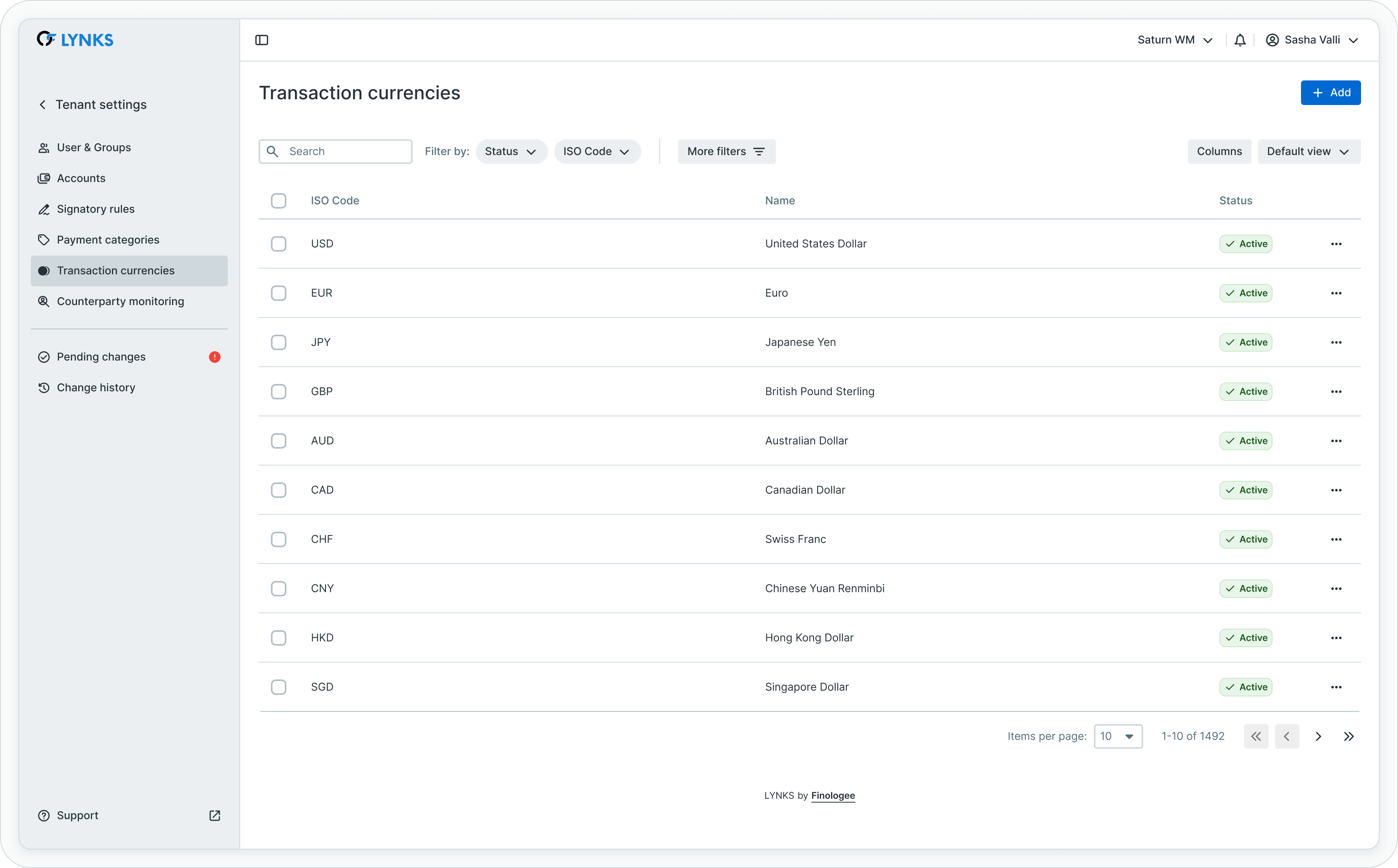
Transaction currencies management interface
The interface displays each currency with its ISO 4217 code, name, and current status. Administrators can enable additional currencies or deactivate currencies that are no longer needed for operations.
Supported currencies
LYNKS supports currencies that have ECB exchange rates available. This includes major world currencies such as USD, GBP, CHF, JPY, and many others. The ECB publishes reference rates for approximately 30 currencies daily, covering the most commonly traded currencies globally.
Currency availabilityOnly currencies with ECB exchange rate data can be enabled in LYNKS. This ensures accurate currency conversion for reporting and dashboard displays. If you require a currency not currently available, contact [email protected].
Currency configuration and management
Administrators can manage which currencies are available for use within the tenant. Enabling a currency makes it available for payment creation, account configuration, and signatory rule scoping.
Enabling currencies
To enable a currency for your tenant:
- Navigate to Settings → Transaction Currencies
- Locate the currency to enable in the available currencies list
- Click the action menu and select Enable, or toggle the currency status
- Confirm the enablement
Once enabled, the currency becomes available throughout the platform for payment creation, filtering, and configuration.
Deactivating currencies
To deactivate a currency no longer needed:
- Navigate to Settings → Transaction Currencies
- Locate the active currency to deactivate
- Click the action menu and select Deactivate
- Confirm the deactivation
Deactivated currencies are no longer available for new payments but remain visible in historical transactions and reports.
Deactivation considerationsBefore deactivating a currency, verify that no active accounts use the currency and review any signatory rules that reference it. Existing payments in the deactivated currency remain unaffected.
Base currency configuration
Each tenant has a designated base currency that serves as the reference for currency conversions and consolidated reporting. The base currency is typically EUR for European organizations and is configured during tenant setup.
Base currency purpose
The base currency is used for:
| Purpose | Description |
|---|---|
| Dashboard aggregation | Total balance and financial widgets display amounts converted to base currency |
| Report consolidation | Multi-currency reports show totals in base currency alongside original amounts |
| Cross-currency comparison | Enables comparison of values across different currency accounts |
| Signatory rule thresholds | Amount ranges in signatory rules are evaluated in transaction currency |
Identifying converted amounts
Throughout LYNKS, converted amounts are indicated with the approximate symbol (≈) to distinguish them from native currency values. This visual indicator helps users understand when exchange rates have been applied.
Base currency changesThe base currency is configured at the tenant level and typically set to EUR. Contact [email protected] if you need to change your tenant's base currency.
ECB exchange rates integration
LYNKS integrates with the European Central Bank to retrieve official euro foreign exchange reference rates. These rates provide a trusted, authoritative source for currency conversion calculations used in reporting and dashboard displays.
Daily rate updates
Exchange rates are fetched daily from the ECB and stored in LYNKS for use in currency conversions. The ECB publishes reference rates around 16:00 CET each working day based on a regular daily concertation procedure between central banks.
| Aspect | Details |
|---|---|
| Source | European Central Bank (ECB) |
| Update frequency | Daily (ECB publishes around 16:00 CET on working days) |
| Rate type | Euro foreign exchange reference rates |
| Usage | Informational display and reporting only |
Historical rates availability
LYNKS maintains historical exchange rate data to support accurate reporting for past transactions. Historical rates ensure that reports and analytics can display converted values using the exchange rate applicable at the time of the transaction.
The historical rate database includes:
- Daily closing rates since platform inception
- Support for point-in-time currency conversion
- Accurate historical reporting across time periods
Exchange rate purposeECB exchange rates in LYNKS are used for informational and reporting purposes only. They are not used for actual foreign exchange transactions, which are handled by your bank at their applicable rates.
Automatic conversion functionality
LYNKS automatically converts foreign currency amounts to the tenant's base currency for consolidated views and reporting. This conversion happens transparently whenever aggregated financial data is displayed.
Conversion applications
Automatic currency conversion is applied in:
| Area | Conversion Application |
|---|---|
| Dashboard widgets | Total balance, total outgoing, total incoming aggregated across currencies |
| Account summaries | Balance totals across multi-currency account portfolios |
| Reports | Consolidated totals alongside original currency amounts |
| Top transactions | Ranking of transactions by value across different currencies |
| Overdue payments | Aggregated overdue amounts across currencies |
Conversion methodology
Currency conversion between non-EUR currencies uses a two-step conversion through EUR as the intermediary:
- Convert source currency to EUR using ECB rate
- Convert EUR to target currency using ECB rate
This methodology ensures consistent conversion using official ECB reference rates, though minor precision differences may occur compared to direct market rates.
Dashboard and reporting integration
Transaction currencies directly impact how financial data is presented in dashboards and reports, enabling meaningful analysis across multi-currency operations.
Dashboard currency display
The dashboard presents financial information with currency context:
- Current financial situation widgets display aggregated values in base currency with the ≈ symbol indicating conversion
- Bank accounts widget shows accounts grouped by currency with native currency balances
- Top transactions ranks payments by converted value for cross-currency comparison
- Cashflow evolution displays balance trends per account in native currency
For dashboard functionality details, see Dashboard - Financial overview widgets, charts, and real-time monitoring.
Reporting capabilities
Reports support multi-currency data with conversion options:
- Export data in original transaction currencies
- Include base currency equivalent columns
- Filter reports by specific currencies
- Generate currency-specific or consolidated reports
For reporting capabilities, see Reports - Account balance reports and statement exports.
Multi-currency accounts support
LYNKS supports accounts denominated in different currencies, with proper handling of balance information and transaction processing for each currency.
Account currency characteristics
| Characteristic | Description |
|---|---|
| Native currency | Each account has a designated currency for its balance and transactions |
| Balance display | Balances shown in account's native currency with optional conversion |
| Payment currency | Payments can be initiated in currencies different from account currency |
| Statement processing | Bank statements processed with proper currency handling |
Cross-currency payments
When creating payments in a currency different from the ordering party account currency, the bank performs the foreign exchange at their applicable rates. LYNKS processes the resulting transactions and reconciles any FX-related entries from bank statements.
For payment creation details, see Credit Transfers - Review payment details before approval.
Currency scoping in signatory rules
Currencies can be used as parameters when defining signatory rules, enabling different approval requirements based on the currency of transactions.
Currency-based approval rules
Signatory rules can specify which currencies they cover:
| Scenario | Configuration |
|---|---|
| All currencies | Rule applies to transactions in any enabled currency |
| Specific currencies | Rule applies only to transactions in selected currencies |
| Currency-specific thresholds | Different approval levels for different currency transactions |
Rule parameter interaction
Currency parameters work in conjunction with other signatory rule parameters (accounts, amounts, payment categories) to define precise approval requirements. The gaps and overlaps analysis considers currency as one of the evaluated parameters.
For signatory rule configuration, see Signatory Rules - Approval workflow configuration.
Best practices
Follow these recommendations for effective currency configuration:
- Enable only needed currencies - Activate only currencies your organization actively uses to keep selection lists manageable
- Review before deactivation - Verify no active accounts or pending transactions use a currency before deactivating it
- Understand conversion limitations - Remember that displayed conversions are for informational purposes using ECB rates, not actual FX rates
- Monitor base currency totals - Use dashboard widgets to track consolidated positions, but refer to native currency values for operational decisions
- Coordinate with signatory rules - When enabling new currencies, review whether signatory rules need updates to cover the new currency
- Consider reporting needs - Plan currency configuration based on both operational and reporting requirements
Related documentation
Explore these related sections to learn more about currency management:
Core Concepts:
- Permissions - Comprehensive explanation of access control and role-based permissions - Understanding access control and currency scoping
Platform Features:
- Dashboard - Financial overview widgets, charts, and real-time monitoring - Currency display in dashboard widgets
- Cash Accounts - Account balances and bank statements - Multi-currency account monitoring
- Credit Transfers - Review payment details before approval - Payment creation with currency selection
- Reports - Account balance reports and statement exports - Multi-currency reporting capabilities
- Signatory Rules - Approval workflow configuration - Currency-based approval rules
- Pending Changes - Configuration change management - Reviewing and approving currency changes
- Change History - Audit trail for configuration - Audit trail for currency configuration
Support
For assistance with currency configuration, enabling additional currencies, or questions about exchange rate integration, contact [email protected].
Updated 3 months ago