Notifications
Configure notification preferences for in-app, email, SMS, and webhook alerts
Introduction
LYNKS provides a notification system that keeps users informed about important platform events through multiple channels. Users can configure their notification preferences to receive alerts via in-app notifications, email, and SMS based on their roles and responsibilities.
The notification system supports various scenarios including payment approvals, counterparty updates, user management events, and transaction status changes.
Prerequisites
Users must have the appropriate permissions to access and configure notification preferences.
Permissions
| Permission | Description |
|---|---|
USER_NOTIFICATION_PREFERENCE | Access and modify personal notification preferences |
In-app notifications
The notification bell icon provides quick access to all notifications related to pending actions and important platform events.
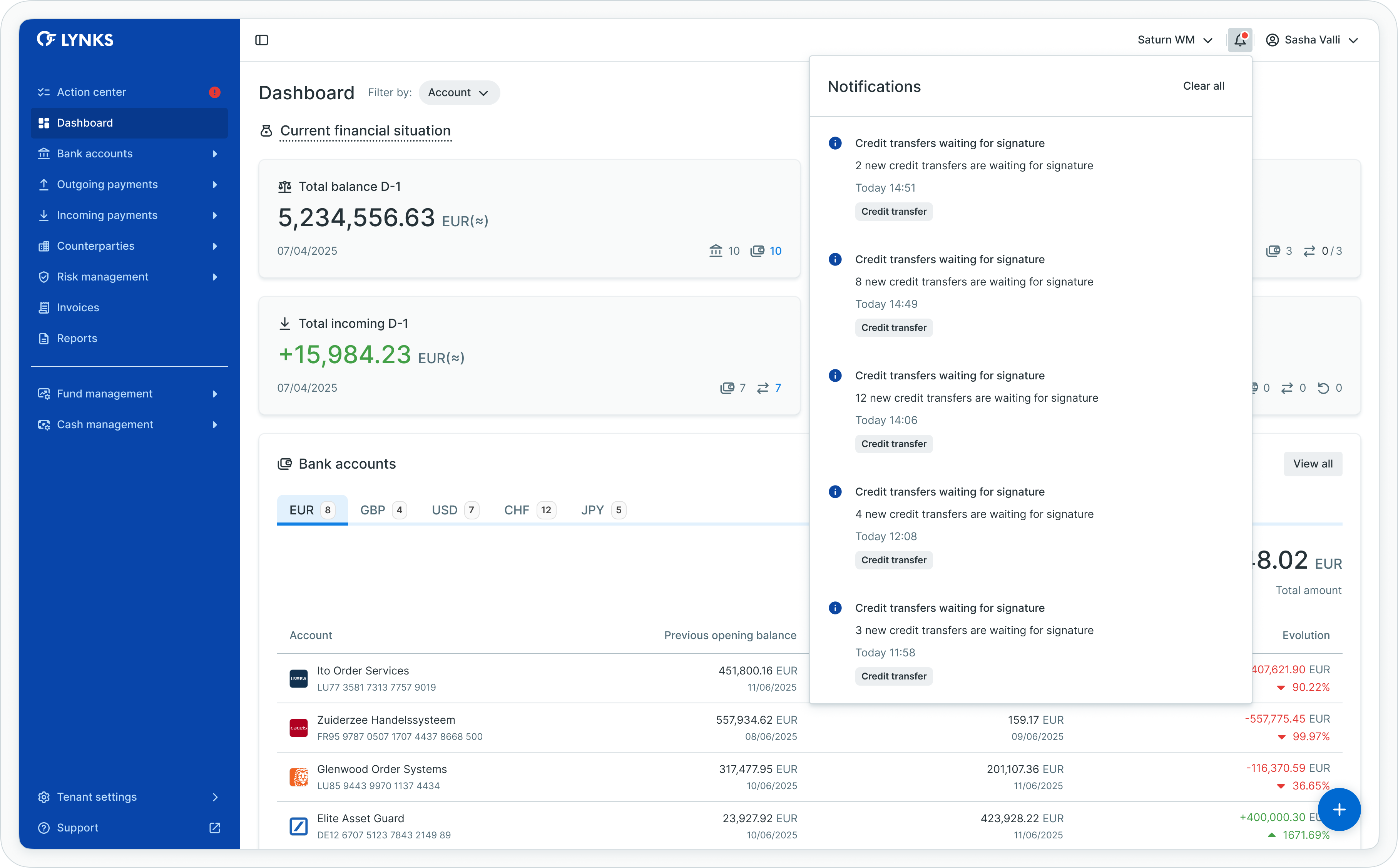
In-app notification panel accessed via the bell icon
In-app notifications appear in real-time and provide immediate visibility into events that require attention. The notification panel displays:
- Pending actions requiring user input
- Updates on items the user created or is involved with
- System notifications and reminders
- Status changes for payments and counterparties
To access in-app notifications:
- Locate the notification bell icon in the upper right corner of the screen
- Click the icon to open the notification panel
- Review notifications and click individual items to navigate to the relevant content
Configuring notification preferences
Users can customize which notifications they receive and through which channels based on their role and responsibilities.
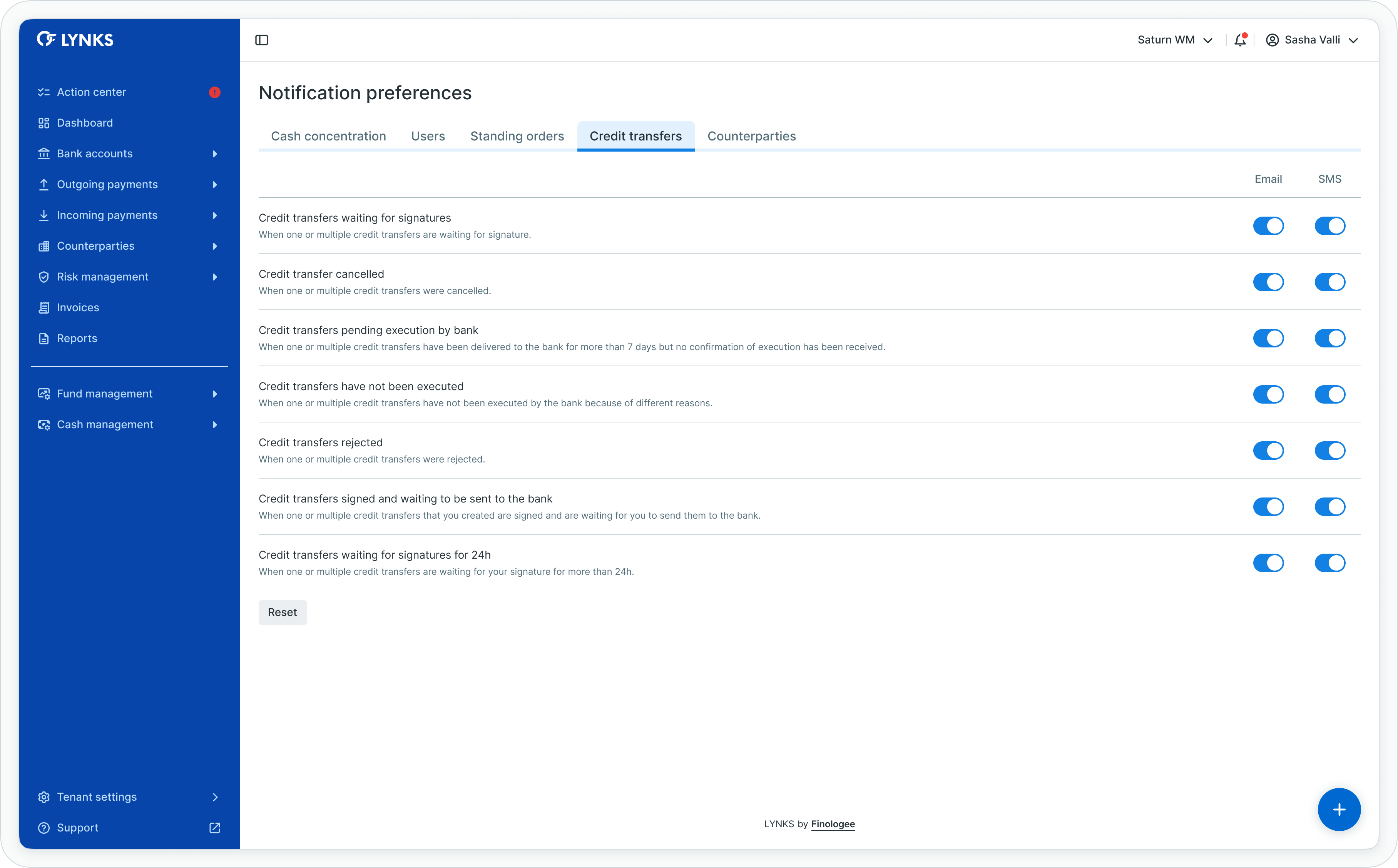
Notification preferences configuration screen
To access notification preferences:
- Click on your name in the upper right corner of the screen
- Select Notification Preferences from the dropdown menu
- Configure preferences for each notification scenario by enabling or disabling channels
- Save changes to apply your preferences
Available channels
| Channel | Description |
|---|---|
| In-app | Notifications displayed in the notification panel within LYNKS |
| Notifications sent to the user's registered email address | |
| SMS | Text message notifications sent to the user's registered phone number |
Channel availabilityEmail and SMS channels must be enabled for your user account by an administrator. If these options are not visible in your preferences, contact your administrator to enable the communication channels.
Notification scenarios
Notification preferences are organized by category based on the type of platform activity. Users receive notifications based on their assigned permissions and roles.
Credit transfer notifications
| Scenario | Description | Default channels |
|---|---|---|
| Credit transfer waiting for authorisation | When payments are created and waiting for your signature | Email, SMS, In-app |
| Transaction authorised and waiting to be sent to bank | When payments you created are signed and ready for bank submission | In-app only |
| Transactions waiting authorisation for 24h | Reminder when payments await your signature for more than 24 hours | None (configurable) |
| Credit transfers pending execution by bank | When payments delivered to the bank have not been confirmed for more than 7 days | Email, SMS, In-app |
| Transaction rejected by a signatory | When payments you created were rejected | Email, SMS, In-app |
| Credit transfer cancelled | When payments were cancelled | None (configurable) |
| Credit transfers have not been executed | When payments failed at the bank | Email, SMS, In-app |
Standing order notifications
| Scenario | Description | Default channels |
|---|---|---|
| Standing order submitted and waiting for authorisation | When a standing order is created and waiting for your signature | Email, SMS, In-app |
Counterparty notifications
| Scenario | Description | Default channels |
|---|---|---|
| Counterparty created and waiting authorisation | When counterparties are created and waiting for your approval | Email, SMS, In-app |
| Counterparty authorised | When counterparties you created are approved | In-app only |
| Counterparty rejected | When counterparties you created were rejected | Email, SMS, In-app |
User management notifications
| Scenario | Description | Default channels |
|---|---|---|
| User created | When a new user is created | Email, SMS, In-app |
| User updated | When a user's details are modified | Email, SMS, In-app |
| User reactivated | When a deactivated user is reactivated | Email, SMS, In-app |
Role-based notificationsThe notification scenarios available to each user depend on their assigned permissions. Users only see notification options relevant to their role.
Resetting preferences
Users can reset their notification preferences to default settings for any category.
To reset notification preferences:
- Navigate to Notification Preferences
- Open the tab for the category you want to reset
- Click the Reset default notifications button
- Confirm the reset in the dialogue
The reset applies only to the currently selected tab, allowing users to restore defaults for specific categories while preserving custom settings in others.
Configuration
Notification channel availability is configured at the user level by administrators.
User notification channels
Administrators can enable or disable email and SMS notification channels for individual users through the User & Groups settings. Users can only configure preferences for channels that are enabled for their account.
For information on managing user notification channels, see User & Groups - User management and access configuration.
LYNKS mobile app notifications
Users with the LYNKS Mobile App enabled receive push notifications for signing requests directly on their mobile device. These notifications work alongside other channels and enable:
- Real-time push notifications for pending signatures
- Direct access to transaction approval from the mobile app
- Biometric authentication for signing
For information on the LYNKS Mobile App, see LYNKS Mobile App - Mobile authentication and push notifications.
Technical specifications
Notification channels
| Channel | Delivery method | Configuration |
|---|---|---|
| In-app | Real-time via web interface | Always available |
| SMTP delivery to registered address | Requires admin enablement | |
| SMS | Text message to registered number | Requires admin enablement |
| LYNKS Mobile App | Push notification | Requires app enablement |
Related documentation
Explore related sections for more information:
- Support - Customer support portal and assistance - Customer support portal and assistance
- Action Center - Centralized task and approval management - Centralized task and approval management
- User & Groups - User management and access configuration - User management and notification channel configuration
- LYNKS Mobile App - Mobile authentication and push notifications - Mobile authentication and push notifications
- Webhooks - Subscribe to platform events and receive real-time callbacks - API-based event integration for external systems
Support
For assistance with notification configuration, contact [email protected].
Updated 12 days ago