
Change history
Audit trail for tenant settings changes with detailed logging and compliance support
Introduction
The Change history section provides a complete audit trail of all modifications made to your organization's tenant settings. Every change, whether approved or discarded, is recorded with detailed information about what was modified, who made the change, who approved or discarded it, and when each action occurred.
This historical record supports compliance requirements, internal audits, and governance processes by maintaining an immutable log of all configuration changes. Administrators can review past decisions, understand how the current configuration evolved, and demonstrate proper change management practices to auditors and regulators.
Prerequisites
Users require appropriate permissions to access the change history section of tenant settings.
Permissions
| Permission | Description |
|---|---|
TENANT_SETTINGS_READ | View change history and audit logs |
Feature flag
Feature flag dependencyChange history is available when the TENANT_SETTINGS_FOUR_EYES_REVIEW tenant flag is enabled. The change history section remains accessible even if the feature is later disabled, preserving access to historical records.
Change history overview
The Change history interface displays a chronological list of all tenant settings changes, organized by approval or discard events. Each entry represents a batch of changes that were either approved together or discarded together.
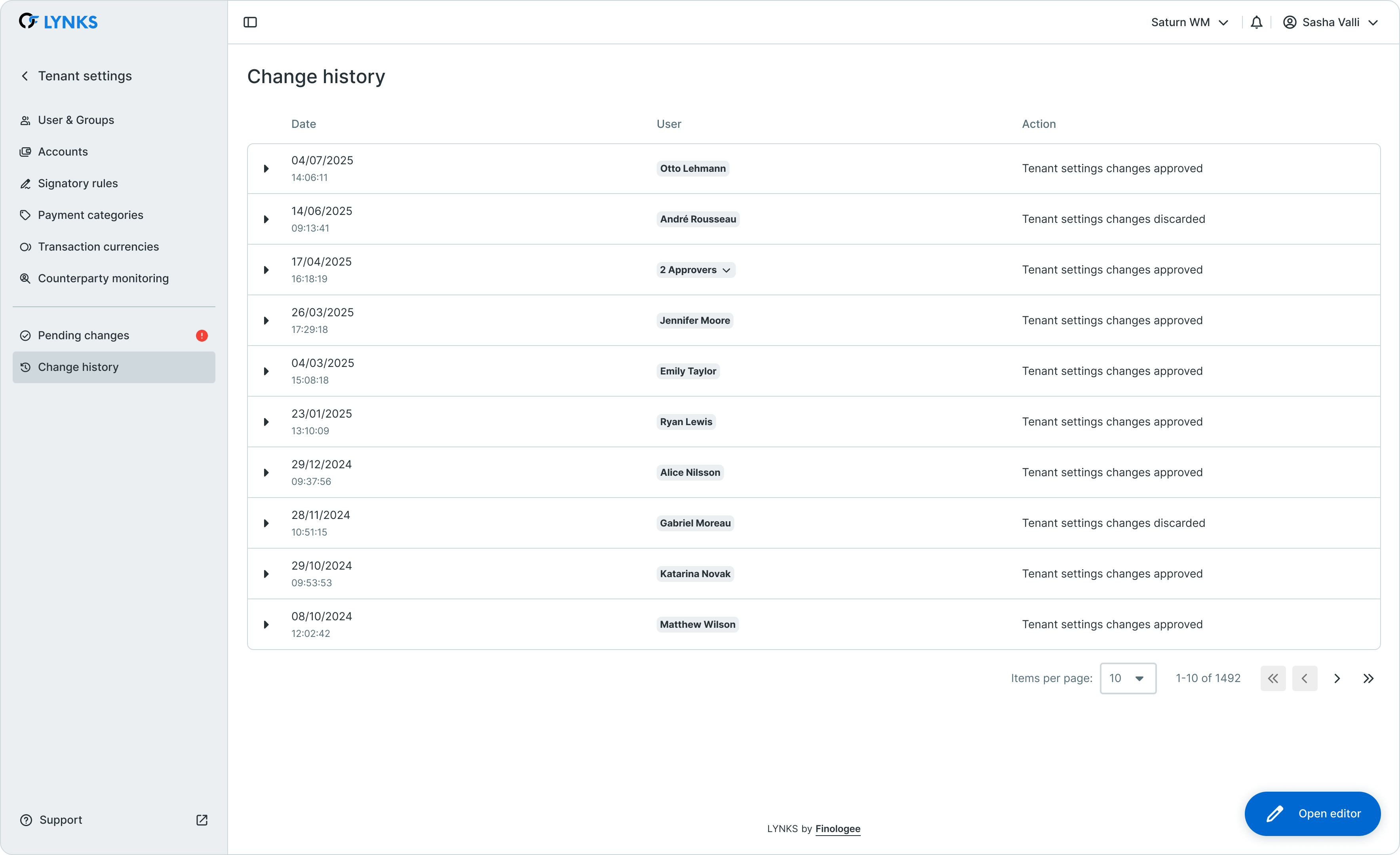
Change history list showing historical configuration changes
Key components
The change history view consists of:
- Event list - Chronological list of approval and discard events
- Event summary - Overview of each event including date, action type, and user
- Expandable details - Detailed breakdown of all changes within each event
- Filter options - Tools to search and filter historical records
Accessing change history
Change history is accessed within the Tenant Settings area of LYNKS.
Navigation
To access change history:
- Navigate to Tenant Settings from the main menu
- Select Change history from the settings menu
- The interface displays all historical changes in reverse chronological order
Viewing configuration change history
The change history provides visibility into all past tenant settings modifications, allowing administrators to understand how the current configuration was established.
Event types
Change history records two types of events:
| Event Type | Description | Recorded Information |
|---|---|---|
| Approved | Changes that were reviewed and approved, becoming effective | All changes applied, approver details, timestamp |
| Discarded | Changes that were rejected and not applied | All changes discarded, who discarded, reason (if provided), timestamp |
Chronological view
Events are displayed in reverse chronological order, with the most recent changes at the top. Each entry shows:
- Date and time of the approval or discard action
- Type of action (approved or discarded)
- User who performed the action
- Number of changes included in the event
Understanding who changed what and when
Each change history entry contains detailed attribution information, enabling full traceability of configuration modifications.
Attribution details
For every recorded event, the system captures:
| Information | Description |
|---|---|
| Editor(s) | User(s) who made the changes in edit mode |
| Approver/Discarding user | User who approved or discarded the changes |
| Edit timestamp | When changes were made |
| Action timestamp | When changes were approved or discarded |
| Discard reason | Explanation provided when changes were discarded (optional) |
Tracking multiple contributors
When multiple administrators make changes before approval, all contributors are recorded. The change history shows which user made each specific modification, providing granular attribution even when changes from multiple editors are approved together.
Detailed change logs
Expanding a change history entry reveals the complete list of modifications included in that approval or discard event.
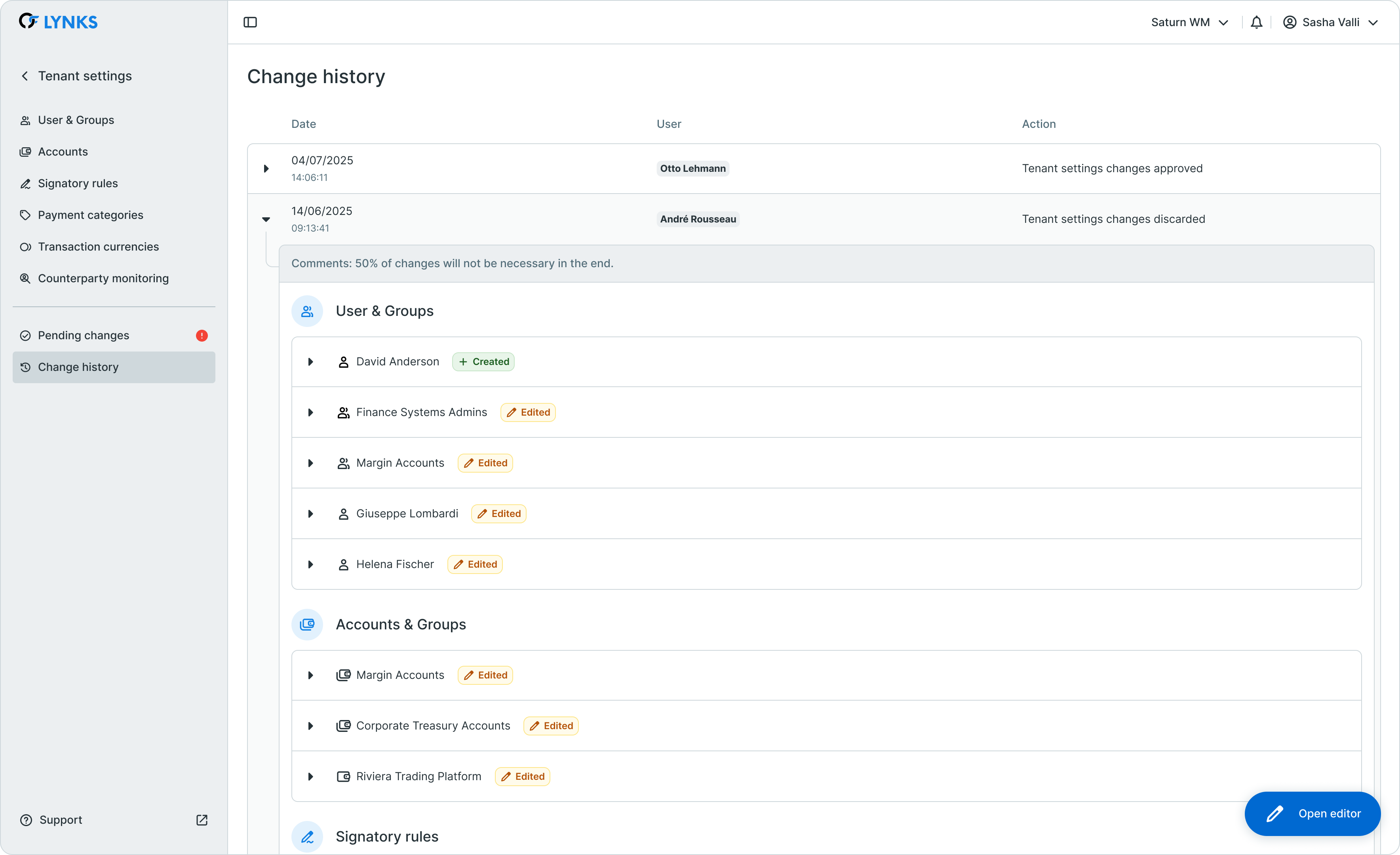
Expanded change history entry showing detailed modification log
Change details
Each expanded entry displays:
- Entity type - What was changed (user, group, signatory rule, account, etc.)
- Entity name - Specific item that was modified
- Change type - Whether the entity was added, edited, or removed
- Field-level changes - For edited entities, specific fields that were modified with before and after values
Change indicators
Changes are displayed with the same visual indicators used in pending changes:
| Indicator | Type | Description |
|---|---|---|
| 🟢 Green | Added | New entities that were created |
| 🔴 Red | Removed | Entities that were deleted or deactivated |
| 🟠 Orange | Edited | Existing entities that were modified |
Direct and dependent changes
The detailed log includes both direct changes (explicitly made by administrators) and dependent changes (indirect modifications resulting from direct changes), providing a complete picture of each approval event's impact.
Compliance and audit support
The change history serves as an essential compliance tool, providing the documentation needed for regulatory requirements and internal governance.
Audit trail characteristics
| Characteristic | Description |
|---|---|
| Immutable | Records cannot be modified or deleted after creation |
| Complete | Every change is recorded, regardless of outcome |
| Timestamped | Precise date and time for all events |
| Attributed | Clear identification of all users involved |
| Detailed | Field-level granularity for all modifications |
Compliance use cases
The change history supports various compliance and audit scenarios:
Regulatory audits - Demonstrate proper change management processes and four-eyes principle compliance to regulators such as CSSF.
Internal audits - Review configuration changes as part of internal control assessments and risk management procedures.
Incident investigation - Trace configuration changes when investigating issues or unexpected system behavior.
Access reviews - Verify that permission changes were properly authorized and approved.
Segregation of duties - Confirm that different users made and approved changes, maintaining proper separation of responsibilities.
Entity-level audit logs
In addition to the centralized change history, individual entities (users, accounts, signatory rules, etc.) maintain their own audit logs. These entity-level logs show all changes made to that specific item over time, accessible from each entity's detail page.
Effective changes that have been approved are reflected in both the centralized change history and the relevant entity's audit log, providing multiple views into the same historical data.
Searching and filtering
The change history provides tools to locate specific changes within the historical record.
Available filters
| Filter | Description |
|---|---|
| Date range | Filter events by time period |
| Action type | Show only approved or discarded events |
| User | Filter by the user who approved or discarded changes |
Search capabilities
Use the search function to find changes related to specific entities, users, or configuration elements. This helps quickly locate relevant historical information when investigating issues or preparing audit documentation.
Best practices
Follow these recommendations for effective use of change history:
- Review periodically - Regularly review change history as part of your governance process to ensure changes align with organizational policies
- Document discard reasons - Always provide clear reasons when discarding changes to maintain a useful historical record
- Export for audits - When preparing for external audits, review and document relevant change history entries in advance
- Cross-reference - Use change history in conjunction with entity-level audit logs for comprehensive investigation of specific configuration items
- Monitor patterns - Watch for unusual patterns in change history that might indicate process issues or unauthorized modification attempts
Related documentation
Explore related sections for more information:
- Approvals - How approval workflows and signature processes function - Understanding approval workflows in LYNKS
- User & Groups - User management and access configuration - Managing users and viewing user audit logs
- Signatory Rules - Approval workflow configuration - Signatory rule configuration and audit trails
- Pending Changes - Configuration change management - Reviewing and approving configuration changes
- Compliance & Audit - Security features, audit trails, and regulatory compliance - Platform-wide compliance and audit features
Support
For assistance with change history or audit-related questions, contact [email protected].
Updated 3 months ago