
Securities accounts
Monitor securities portfolios, track performance and risk analytics, and access investment reports and statements
Introduction
The Securities Accounts section extends LYNKS capabilities beyond cash management to provide comprehensive investment portfolio monitoring. This integrated reporting solution consolidates securities data from multiple safekeeping accounts, enabling users to track holdings, monitor valuation evolution, analyze risk distribution, and maintain a complete overview of their investment positions alongside cash accounts.
The interface presents securities information through three complementary perspectives: a dashboard with aggregated portfolio metrics, an accounts view displaying individual safekeeping accounts, and a portfolio view showing consolidated security positions across all accounts. This holistic approach enables informed decision-making about portfolio allocations and investment strategies.
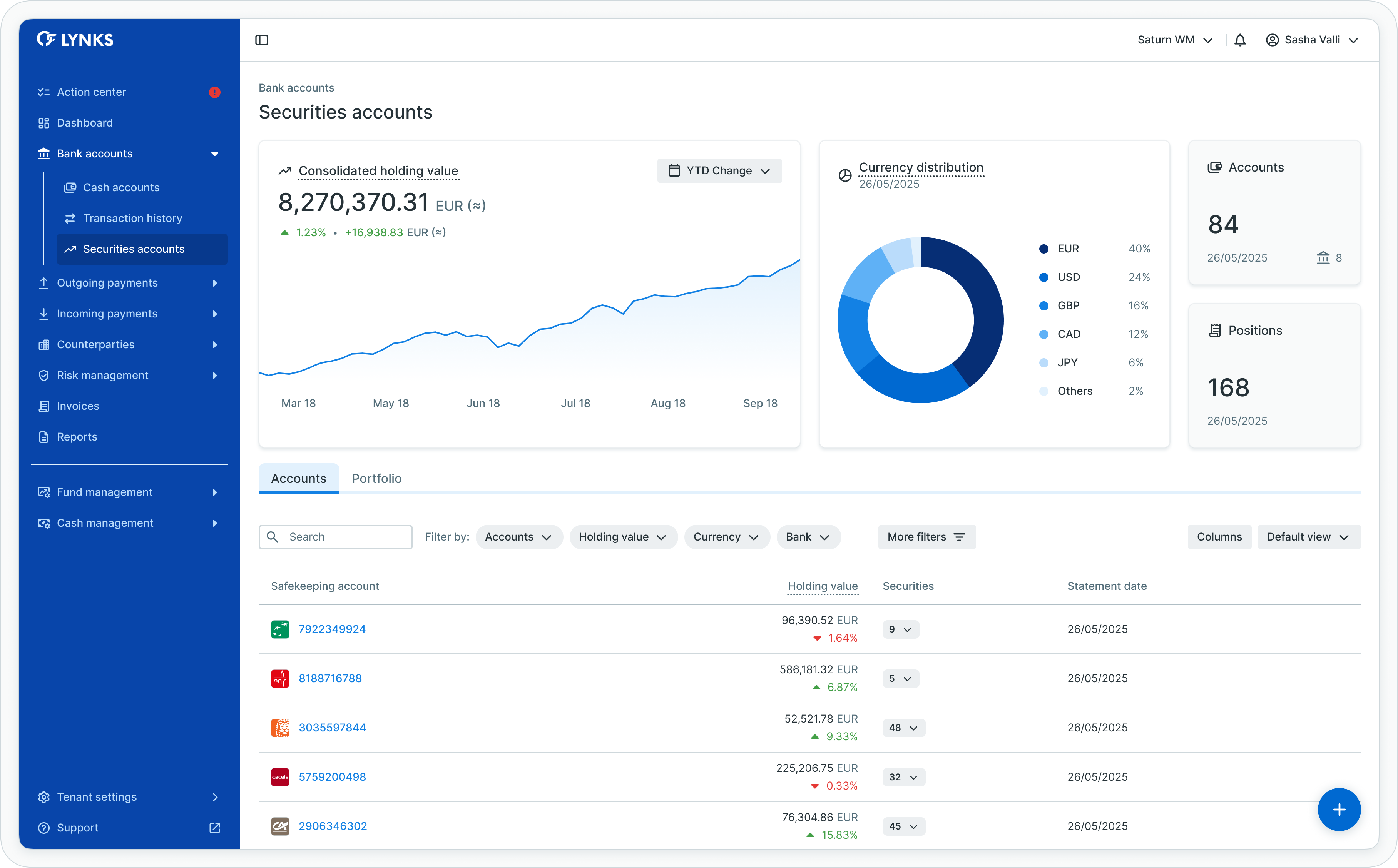
Securities accounts overview
Prerequisites
Users must have the appropriate permissions to view securities account information. The interface displays only securities accounts and positions for which you have viewing rights.
Permissions
| Permission | Description |
|---|---|
SECURITIES_READ | View securities accounts, holdings, positions, and valuation data |
ORDERING_PARTY_STATEMENT_READ | Access and download securities account statements |
Account scopingUsers see only securities accounts they have been granted access to through their permission configuration. Securities account visibility respects account-level scoping for data segregation.
Feature availabilitySecurities account reporting requires specific configuration for your tenant. Contact [email protected] to enable securities reporting functionality.
Securities accounts overview
The Securities Accounts section consolidates investment data from bank statements into an accessible reporting interface, providing transparency into portfolio composition, valuation trends, and risk exposure.
Data sources
Securities information is sourced from bank statements received via SWIFT MT535 messages, which contain detailed holdings information including:
- Security identification (ISIN codes)
- Quantity or nominal amounts held
- Valuation prices and types
- Currency denomination
- Safekeeping account details
- Statement dates and sequences
Portfolio visibility
Users can monitor:
- Overall portfolio status - Aggregated valuation and composition across all accessible accounts
- Individual safekeeping accounts - Account-specific holdings and performance
- Security positions - Individual security details per account or consolidated across accounts
- Valuation evolution - Historical trends in aggregate holding value
- Risk distribution - Currency exposure analysis across the portfolio
Accessing securities accounts
The Securities Accounts section is accessible from the main navigation menu under Bank Accounts, providing immediate access to all securities reporting for which you have viewing rights.
Navigation
To access Securities Accounts:
- Locate the main navigation menu on the left side of the LYNKS interface
- Expand the Bank Accounts section
- Click on Securities Accounts to open the securities overview
- The interface opens on the dashboard view by default, displaying aggregated portfolio metrics
Feature availabilitySecurities account reporting requires specific configuration for your tenant. If you do not see Securities Accounts in your navigation menu, contact [email protected] to enable this functionality.
Using the dashboard view
The dashboard view provides high-level portfolio analytics through dedicated widgets, offering immediate insight into your securities position.
Viewing dashboard widgets
Upon accessing Securities Accounts, the dashboard displays automatically:
- Consolidated holding value widget - Interactive graph showing portfolio valuation evolution over time
- Currency distribution widget - Pie chart illustrating holdings breakdown by currency
- Accounts counter - Total number of accessible safekeeping accounts
- Positions counter - Total number of unique security positions
Interacting with dashboard charts
To analyze dashboard data:
-
Holding value evolution graph
- Hover over data points to view specific values and dates
- Observe trends in total portfolio value based on statement history
- Identify significant valuation changes over time
-
Currency distribution pie chart
- Review percentage breakdown of holdings by currency
- Identify dominant currency exposures
- Assess foreign exchange risk across your portfolio
Navigating to detailed views
From the dashboard, access detailed information:
- Click the Accounts tab to switch to the accounts list view
- Or click the Portfolio tab to switch to the consolidated portfolio view
- The selected view replaces the dashboard, displaying detailed tables
Switching between views
Securities Accounts provides three complementary views accessible through tabs: Dashboard, Accounts, and Portfolio.
Changing views
To switch between different views:
- Locate the view tabs at the top of the securities section (Dashboard, Accounts, Portfolio)
- Click your desired tab
- The interface refreshes to display the selected view
Your selected view persists during your session, reopening the same view when you navigate back to Securities Accounts.
View purposes
Choose the appropriate view for your needs:
- Dashboard - High-level portfolio analytics and aggregated metrics
- Accounts - Account-by-account holdings analysis and statement access
- Portfolio - Consolidated security-level view across all accounts
Dashboard view
The dashboard provides aggregated portfolio analytics through dedicated widgets, offering a high-level overview of the current investment position across all accessible securities accounts.
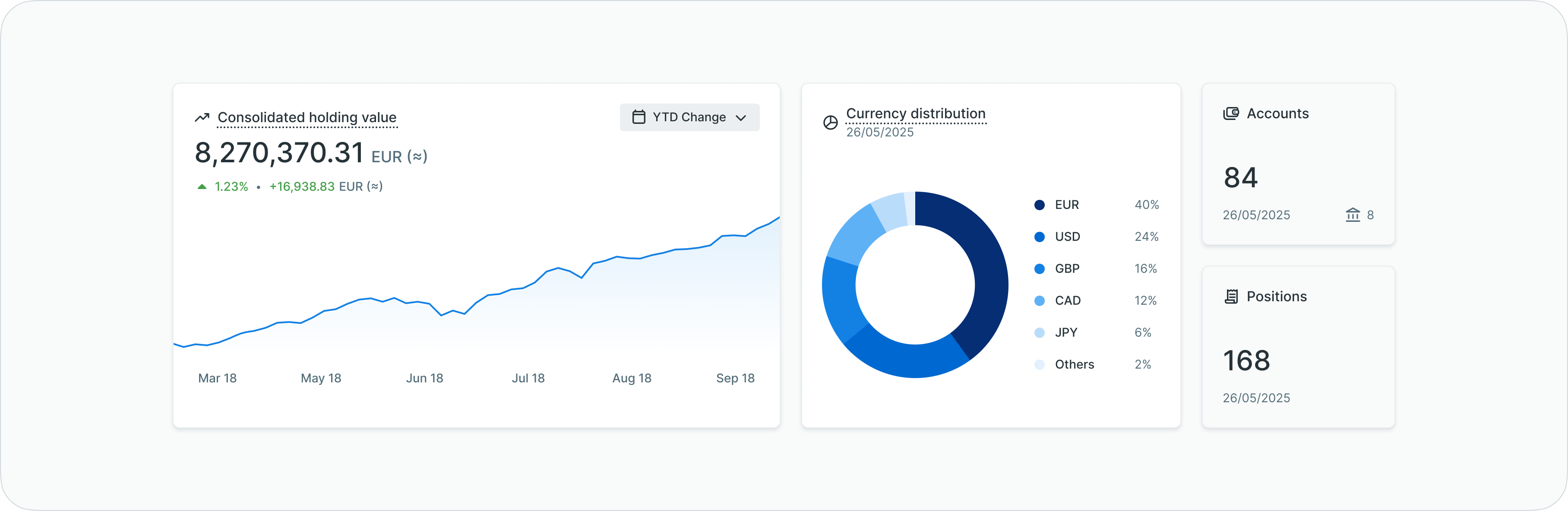
Securities dashboard with portfolio analytics
Dashboard widgets
| Widget | Description |
|---|---|
| Consolidated holding value | Interactive graph displaying the evolution of total portfolio value over time based on statement history |
| Currency distribution | Pie chart illustrating the percentage breakdown of holdings by currency, enabling risk exposure analysis |
| Accounts | Counter displaying the total number of safekeeping accounts accessible to the user |
| Positions | Counter showing the total number of unique security positions across all accounts |
These widgets provide immediate insight into portfolio composition and valuation trends, enabling users to quickly assess their investment position and identify changes in portfolio distribution.
Accounts list view
The accounts list displays all accessible safekeeping accounts in a comprehensive table format, showing essential account information and current holdings data for each securities account.
Information displayed
The accounts list table includes:
- Bank name and logo
- Safekeeping account identifier
- Account holder information
- Primary account currency
- Holding value (total valuation of securities in the account)
- Number of positions held
- Statement date (most recent statement received)
- Previous holding value for comparison
- Previous statement date
Table functionality
The accounts list supports standard table features:
- Column customization - Show, hide, reorder, and resize columns according to preferences
- Filtering - Apply filters by bank, currency, holding value ranges, number of positions, and statement dates
- Search - Quick search across account identifiers and holder information
- Sorting - Sort by any column to organize account information
- View persistence - Save customized table configurations for future sessions
Related functionalityFor detailed information about table features, filtering, and view customization, see Platform Navigation - Detailed guide to the head-up display, table views, filters, and search functionality.
Viewing account details
Safekeeping accounts in the accounts list view provide access to detailed holdings information, valuation evolution, and statement history through the account details screen.
Opening account details
To view detailed information for a safekeeping account:
- Navigate to the Accounts tab in Securities Accounts
- Locate the desired safekeeping account in the table
- Click anywhere on the account row
- The account details screen opens, displaying expandable information sections
Navigating account sections
The account details screen organizes information into three expandable sections:
-
Overview section - Click to expand and view:
- Account identification and holder details
- Bank information and contact details
- Holding value evolution graph with historical valuations
- Latest holding value with comparison to previous statement
- Account status and configuration
-
Securities section - Click to expand and view:
- Complete list of positions held within the account
- Security identification (ISIN, name)
- Quantity or nominal amounts held
- Average price or valuation for each position
- Holding value per security
- Currency and price type information
-
Statements section - Click to expand and view:
- All received securities account statements
- Statement dates and sequence numbers
- Historical holdings data
Analyzing holding evolution
To review valuation trends:
- Expand the Overview section in account details
- Locate the holding value evolution graph
- Hover over data points to view specific values and dates
- Observe valuation changes over time based on received statements
- Identify trends and significant changes in account value
Reviewing securities positions
To analyze individual holdings:
- Expand the Securities section in account details
- Review the complete list of positions held in the account
- Identify which securities contribute most to account valuation
- Note quantity held, current valuations, and currency denominations
- Use table sorting to organize securities by holding value, quantity, or name
Downloading securities statements
The statements section within account details provides access to all received securities account statements in their original format.
Accessing statements
To view statements for a safekeeping account:
- Open the account details by clicking an account row in the Accounts list
- Scroll to the Statements section
- Expand the section if not already open
- The statements list displays all received MT535 statements in reverse chronological order
Expanding statement content
To review holdings within a specific statement:
- Locate the statement you want to review in the statements list
- Click the expansion arrow or anywhere on the statement row
- The expanded view displays all security positions included in that statement
- Review individual holdings as they appeared at the statement date
- Click the expansion arrow again to collapse the statement
Downloading statement files
To download securities statements:
- Locate the desired statement in the statements list
- Find the download icon or action button (typically on the right side of the statement row)
- Click the download button
- The statement file downloads in its original MT535 format
- Save the file to your local system for:
- Reconciliation with custodian bank records
- Audit and compliance purposes
- Integration with portfolio management systems
- Historical record keeping
Viewing portfolio details
The portfolio view provides security-level analysis, consolidating positions of the same security held across multiple safekeeping accounts.
Opening security details
To view detailed information for a security across your portfolio:
- Navigate to the Portfolio tab in Securities Accounts
- Locate the desired security in the portfolio table
- Click anywhere on the security row
- The portfolio details screen opens, showing comprehensive security information
Navigating portfolio details sections
The portfolio details screen displays:
-
Holding value evolution - Graph showing historical valuation of this security across all accounts
- Hover over data points to view specific values and dates
- Observe how the security performs over time in your portfolio
-
Related accounts - List of all safekeeping accounts holding this security
- View quantities and values per account
- Identify which accounts hold positions in this security
- Compare holdings across different custodian banks
-
Related statements - List of all statements that include this security
- Track historical holdings across time periods
- Access statements containing this security position
Account details view
Selecting a safekeeping account from the list opens the account details screen, providing comprehensive information about the selected securities account organized into expandable sections.
Portfolio view
The portfolio view presents a consolidated perspective of all securities positions across multiple safekeeping accounts, enabling users to analyze holdings at the security level rather than the account level.
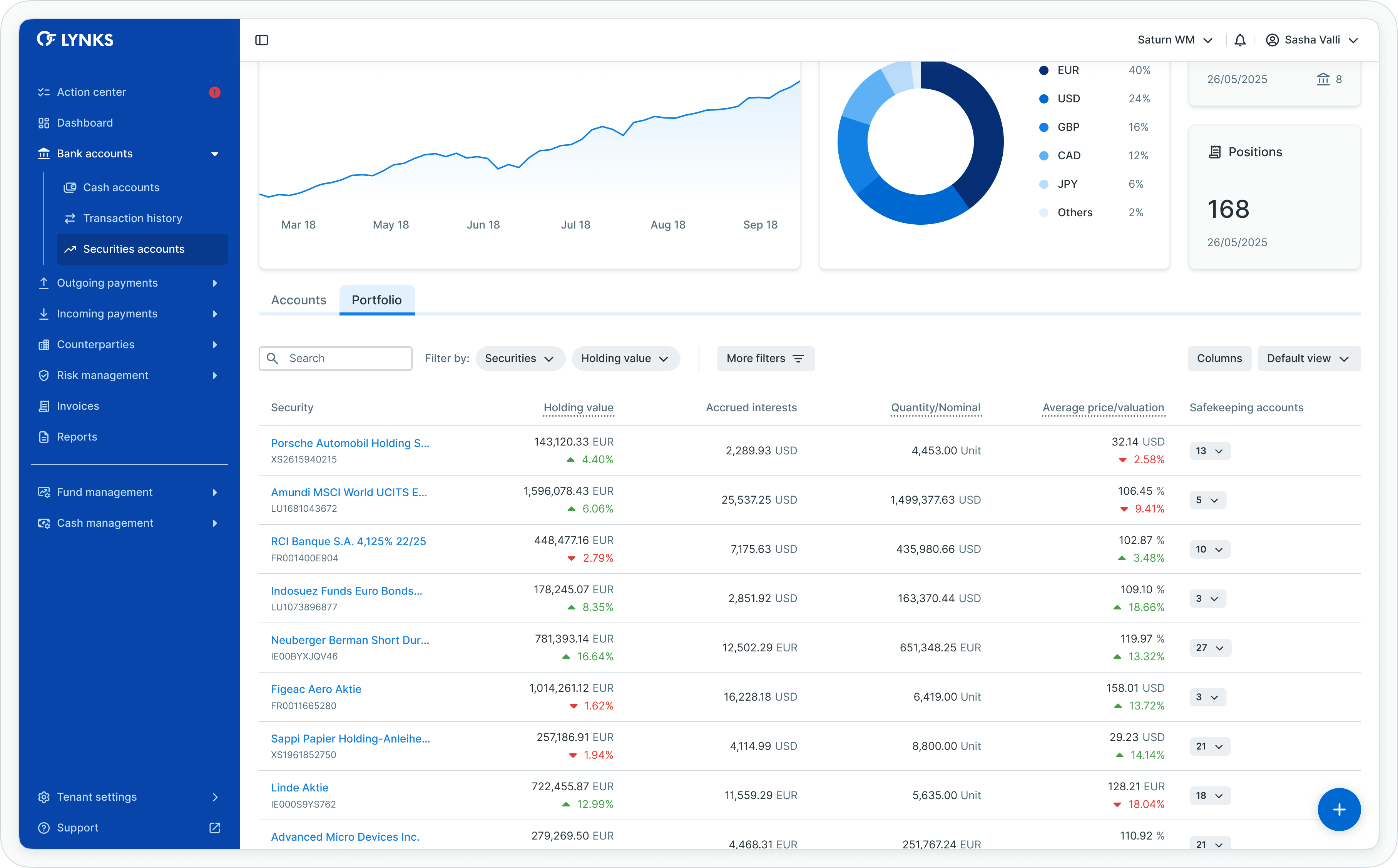
Portfolio view with consolidated positions
Information displayed
The portfolio list table includes:
- Security identification (ISIN, name, description)
- Consolidated holding value across all accounts holding this security
- Total quantity or nominal amount held
- Average price or valuation
- Primary currency
- Number of safekeeping accounts holding the security
- Price type (actual, percentage, yield, premium, discount, unknown)
- Price source (market, indicative)
Consolidated analysis
The portfolio view consolidates positions of the same security held across different safekeeping accounts, providing:
- Total exposure to individual securities
- Average pricing across accounts
- Distribution analysis showing which accounts hold specific securities
- Simplified decision-making for rebalancing or trading activities
Portfolio details view
Selecting a security from the portfolio list opens the portfolio details screen, providing comprehensive information about that specific security across all accounts.
Information sections
The portfolio details screen displays:
- Holding value evolution - Graph showing the historical valuation of this security across all accounts
- Related accounts - List of all safekeeping accounts holding this security, with quantities and values per account
- Related statements - List of all statements that include this security, enabling historical tracking
This view enables users to understand how a specific security performs across their portfolio and identify which accounts hold positions in the security.
Technical specifications
Understanding securities account terminology helps users interpret the data presented throughout the interface.
Balance types
| Balance Type | Definition |
|---|---|
| Unit | Quantity expressed as a number (e.g., number of shares) |
| Face amount | Quantity expressed as an amount representing the principal of a debt instrument |
Price types
| Price Type | Definition |
|---|---|
| Actual | Price expressed as an amount of currency per unit or per share |
| Percentage | Price expressed as a percentage of par |
| Yield | Price expressed as a yield |
| Premium | Price expressed as percentage points above par (e.g., 2.0% premium = 102 when par is 100) |
| Discount | Price expressed as percentage points below par (e.g., 2.0% discount = 98 when par is 100) |
| Unknown | Unknown price type |
Price sources
| Price Source | Definition |
|---|---|
| Indicative | Estimated price used for valuation purposes |
| Market | Last reported or known price of a financial instrument in a market |
These classifications appear throughout the securities reporting interface, particularly in account details and portfolio views where pricing information is displayed.
Use cases
Securities account reporting serves specific industry needs, providing value for organizations managing investment portfolios alongside operational cash accounts.
Fund managers
Fund managers adopting securities account reporting experience:
- Streamlined reporting - Integrated cash and securities data enables quick generation of comprehensive, compliance-ready reports, saving time and effort
- Informed decision-making - Viewing both cash and securities positions in one platform with consistent structure allows asset managers to make more informed decisions about portfolio allocations and overall performance
- Consolidated visibility - Single interface for monitoring investment positions across multiple custodian banks and safekeeping accounts
Life insurance providers
Life insurance companies leverage securities reporting to:
- Optimize asset allocation - Tracking both cash and securities enables better matching of assets to liabilities, facilitating more strategic investment decisions
- Simplify compliance - Integrated reporting reduces manual processes involved in generating regulatory reports, ensuring compliance with industry requirements
- Monitor risk exposure - Currency distribution analysis helps assess and manage foreign exchange risk within investment portfolios
Asset managers and depositaries
Investment management firms and depositary banks use securities reporting for:
- Portfolio oversight - Maintain comprehensive visibility into fund holdings and investment positions
- Safekeeping monitoring - Track securities held in custody on behalf of clients
- Statement reconciliation - Access historical statements and holdings data for audit and verification purposes
Best practices
Follow these recommendations to maximize the value of securities account reporting:
- Review dashboard regularly - Check consolidated holding value and currency distribution to understand current portfolio composition
- Monitor valuation trends - Use evolution graphs to identify significant changes in portfolio value and investigate causes
- Analyze currency exposure - Review currency distribution widget to assess foreign exchange risk and consider hedging strategies
- Use portfolio view for rebalancing - Leverage consolidated security positions to identify overweight or underweight holdings
- Cross-reference with cash accounts - View securities and cash positions together to understand total asset position and liquidity
- Track statement dates - Monitor when statements were last received to ensure data currency and identify missing statements
- Compare account performance - Use account details views to evaluate which safekeeping accounts deliver strongest performance
- Download statements for records - Maintain local copies of securities statements for audit trails and regulatory compliance
Related documentation
Explore related sections for more information:
- Platform Navigation - Detailed guide to the head-up display, table views, filters, and search functionality - Tables, filters, search, and view customization
- Permissions - Comprehensive explanation of access control and role-based permissions - Understanding access control and account scoping
- Dashboard - Financial overview widgets, charts, and real-time monitoring - High-level financial overview including cash positions
- Cash Accounts - Account balances and bank statements - Payment account monitoring and balance tracking
- Reports - Account balance reports and statement exports - Securities reports and portfolio exports
Support
For assistance with securities account reporting or questions about portfolio data, contact [email protected].
Updated 3 months ago