
Direct debits
Monitor SEPA Direct Debit collections, track individual direct debits within collections, and manage incoming payment workflows
Introduction
The Direct Debits feature enables creditors to monitor and manage SEPA Direct Debit (SDD) collections, providing comprehensive visibility into incoming payment flows initiated through mandate-based debtor account debiting. This interface consolidates collection information, tracks individual direct debits within collections, and enables efficient monitoring of payment collection activities.
Direct debit collections are created exclusively through the LYNKS external API, with the platform interface providing monitoring, management, and authorization capabilities. Users can track collection progress, review individual direct debits, monitor authorization workflows, and manage collection lifecycles from creation through settlement.
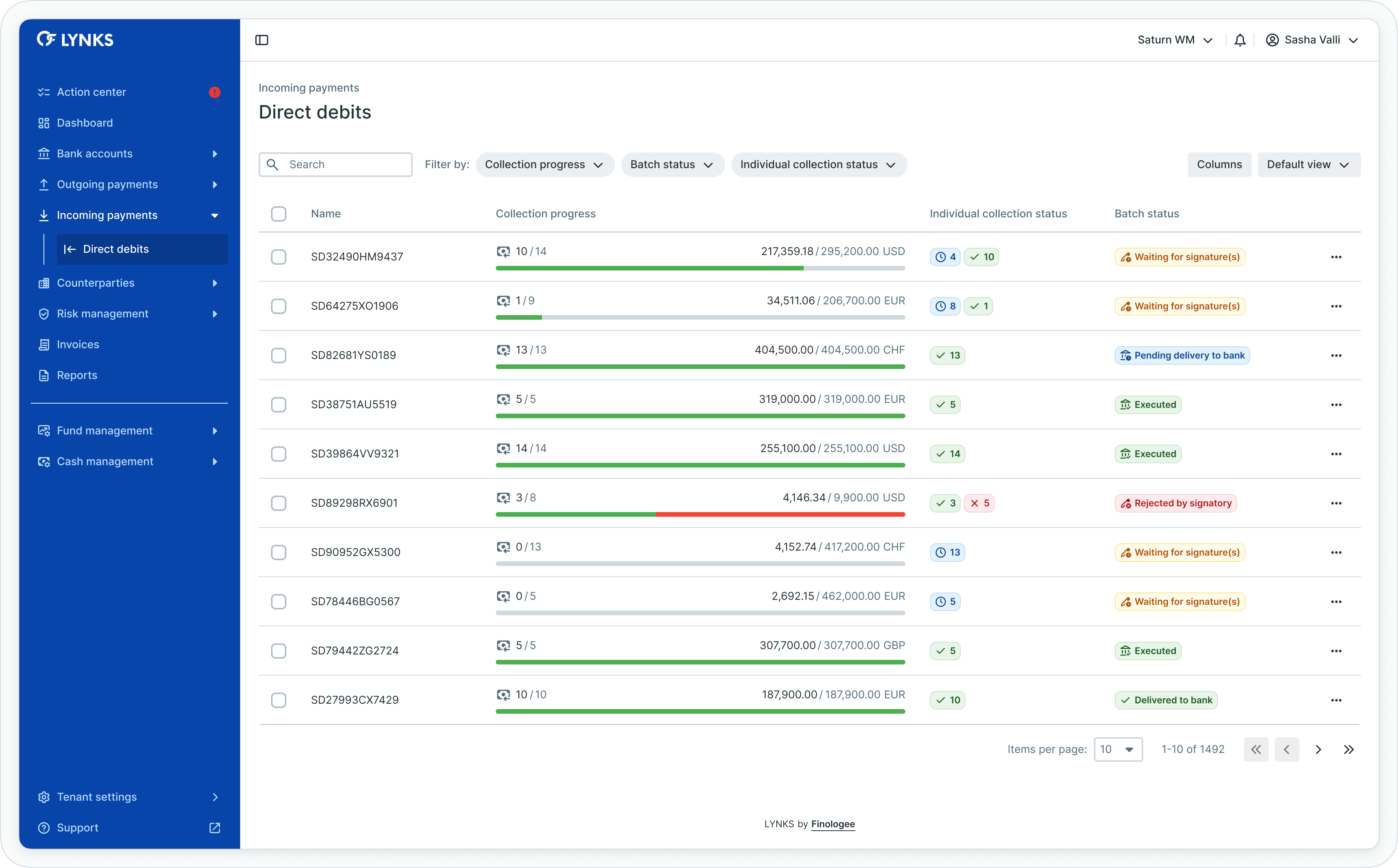
Direct debits list view
Prerequisites
Users must have the appropriate permissions to view and manage direct debit collections. The interface displays only direct debits associated with creditor accounts to which you have access rights.
Permissions
| Permission | Description |
|---|---|
DIRECT_DEBIT_READ | View direct debit collections, collection details, and individual direct debits |
DIRECT_DEBIT_CREATE | Create direct debit collections via API |
DIRECT_DEBIT_AUTHORISE | Sign or reject direct debit batches |
DIRECT_DEBIT_CANCEL | Cancel direct debit batches before bank submission |
DIRECT_DEBIT_SEND_TO_BANK | Manually send direct debits to the bank |
DIRECT_DEBIT_SKIP_4EYES | Create direct debits without approval requirement |
Account scopingUsers see only direct debit collections associated with creditor accounts they have been granted access to through their permission configuration. Direct debit visibility respects account-level scoping for data segregation.
API-based creationDirect debit collections can only be created through the LYNKS external API. For detailed information about API integration and direct debit creation, see the LYNKS API documentation at https://docs.lynks.lu/reference/
Direct debits overview
Direct debit collections enable creditors to initiate incoming payments by debiting debtor accounts according to established SEPA Direct Debit mandates. Each collection contains one or more individual direct debits, with all direct debits in a collection sharing the same creditor account and collection date.
Collection lifecycle
Direct debit collections progress through defined stages:
- Creation via API - Collection created through LYNKS API with individual direct debits
- Authorization - Collection of required signatures according to signatory rules
- Bank submission - Transmission of authorized collection to the bank
- Collection execution - Bank processes direct debits and settles incoming payments
Each stage provides specific information relevant to the collection's current state, enabling users to understand collection progress and identify any issues requiring attention.
Accessing direct debits
Direct debit collections are accessible from the main navigation menu under Incoming Payments, providing immediate access to all collection data.
Navigation
To access direct debits:
- Locate the main navigation menu on the left side of the LYNKS interface
- Expand the Incoming Payments section
- Click on Direct Debits to open the collections list
- The interface displays all direct debit collections for accessible creditor accounts
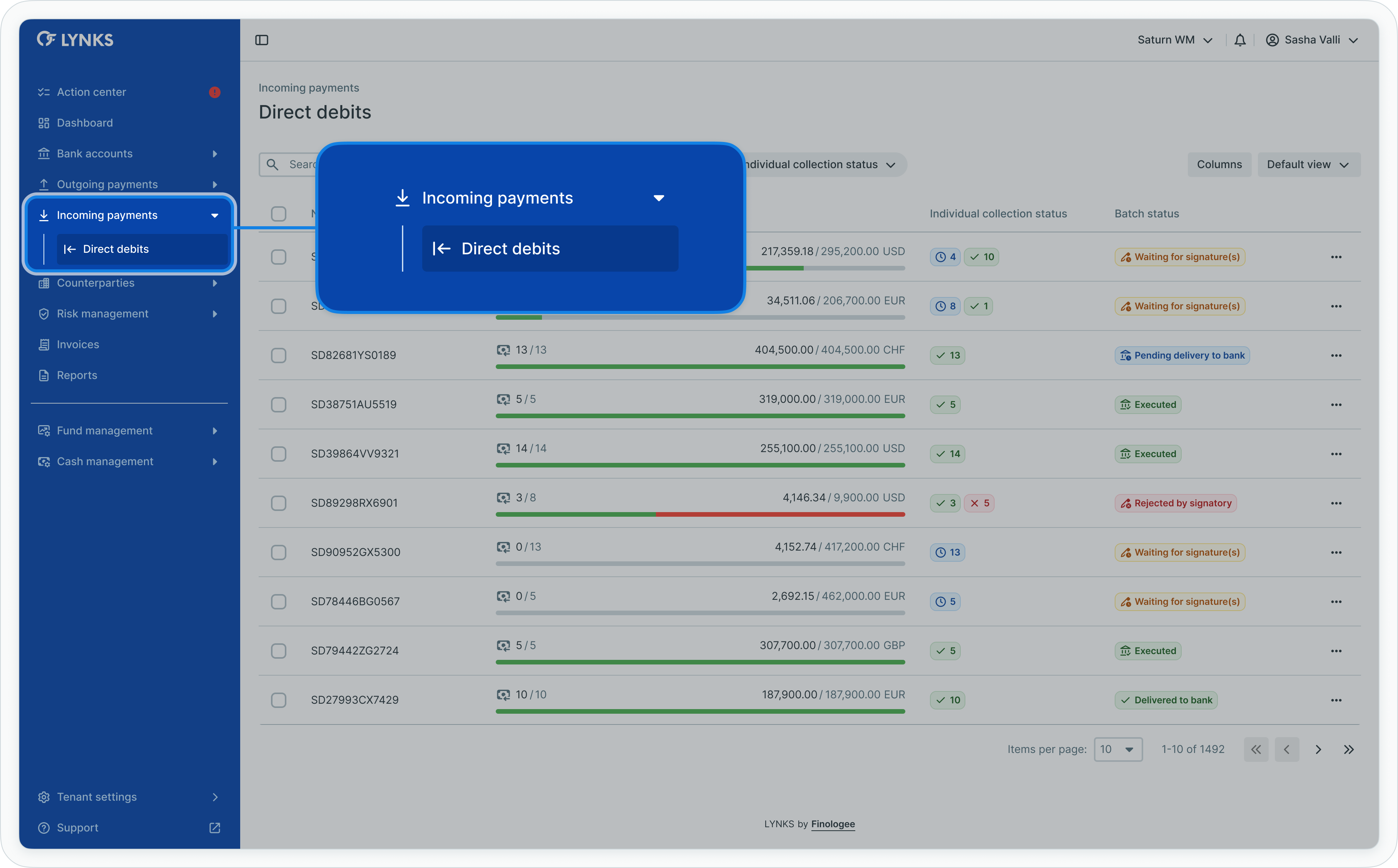
Navigation to Direct Debits
Viewing direct debit collections
The direct debits list provides a comprehensive overview of all collections, enabling quick assessment of collection progress and status.
Information displayed
The direct debits list table includes:
- Collection reference
- Creditor account information
- Collection amount and currency
- Number of individual direct debits in the collection
- Number of distinct counterparties (debtors)
- Collection progress indicator
- Current status
- Expected collection date
- Creation date and creator
Using filters and search
To locate specific collections:
Applying filters:
- Click the filter controls near the top of the list
- Select filter criteria:
- Status
- Creditor account
- Date range (expected collection date, creation date)
- Amount range
- Number of direct debits
- Apply multiple filters simultaneously for precise views
- The list updates to show only matching collections
Using search:
- Locate the search bar at the top of the list
- Enter search terms:
- Collection references
- Creditor account numbers
- Counterparty names
- The list filters automatically to display matching collections
Clearing filters:
- Click individual filter chips to remove specific filters
- Or click "Clear all filters" to remove all filters simultaneously
- The list refreshes to display all collections
Table functionality
The direct debits list supports standard table features:
- Column customization - Show, hide, reorder, and resize columns according to preferences
- Sorting - Sort by any column to organize collection information
- Bulk actions - Select multiple collections for batch operations
- View persistence - Save customized table configurations for future sessions
Related functionalityFor detailed information about table features, filtering, and view customization, see Platform Navigation - Detailed guide to the head-up display, table views, filters, and search functionality.
Viewing collection details
Each direct debit collection has a dedicated details screen providing centralized access to collection information, individual direct debits, and complete audit history.
Opening collection details
To view detailed information for a collection:
- Locate the desired collection in the direct debits list
- Click anywhere on the collection row
- The collection details screen opens, displaying comprehensive information
Details screen sections
The collection details screen organizes information into dedicated sections:
- Payment information and status - Key collection details and current state
- Timeline - Visual representation of collection progress through stages
- Included direct debits - List of individual direct debits within the collection
- Audit log - Complete history of actions performed on the collection
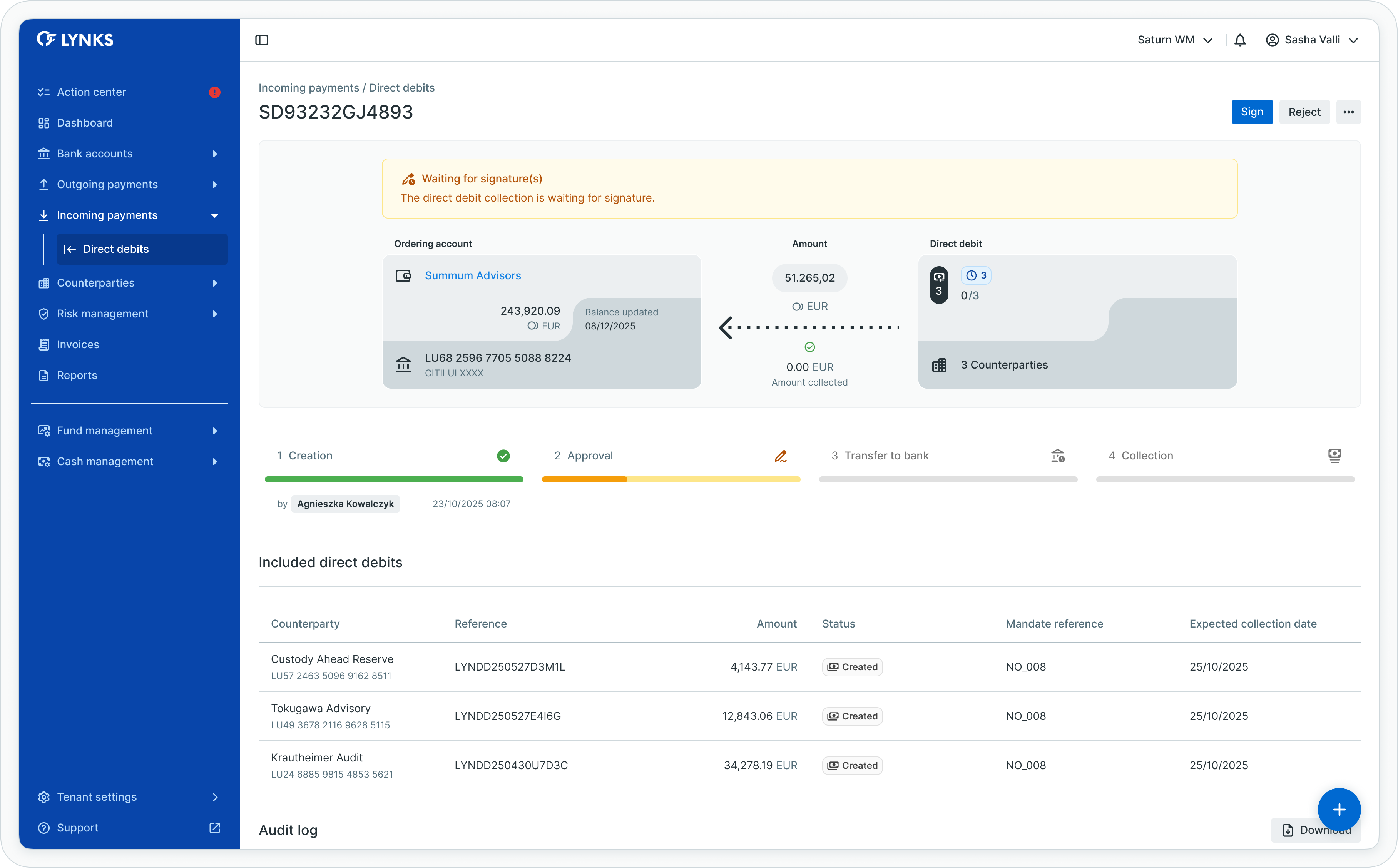
Direct debit collection details
Payment information and status
The top section displays critical collection information with status-specific details and management actions.
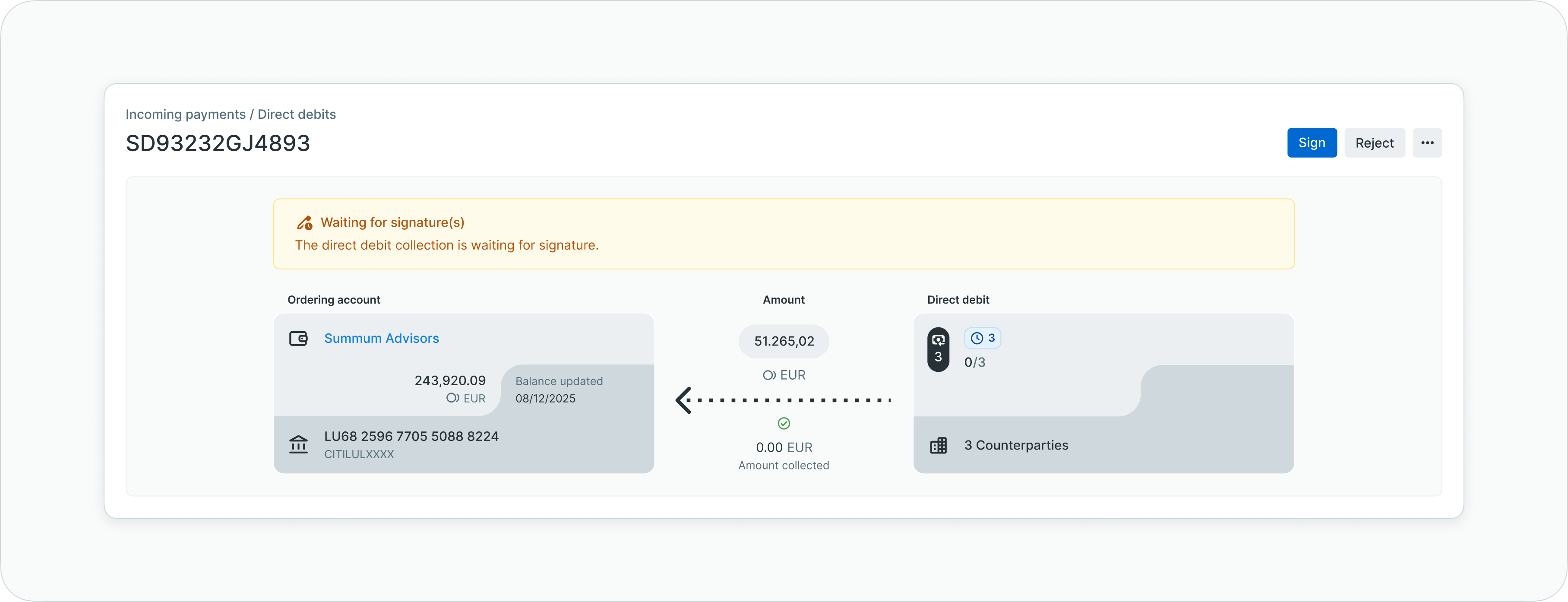
Payment information and status section
Information displayed
- Collection reference - Unique identifier displayed prominently
- Status alert - Current status with descriptive text and status-specific color
- Creditor account details - IBAN, BIC, and current balance
- Collection amount - Total amount to be collected across all direct debits
- Collection currency - Currency for the collection
- Direct debit count - Number of individual direct debits in the collection
- Counterparty count - Number of distinct debtors
- Management buttons - Actions available based on current status
Status-specific displayThe information displayed varies according to the collection's current status, showing relevant data and available actions appropriate to each processing stage.
Timeline visualization
The timeline section presents a visual representation of the collection's progress through four major stages, capturing status transitions and key events.
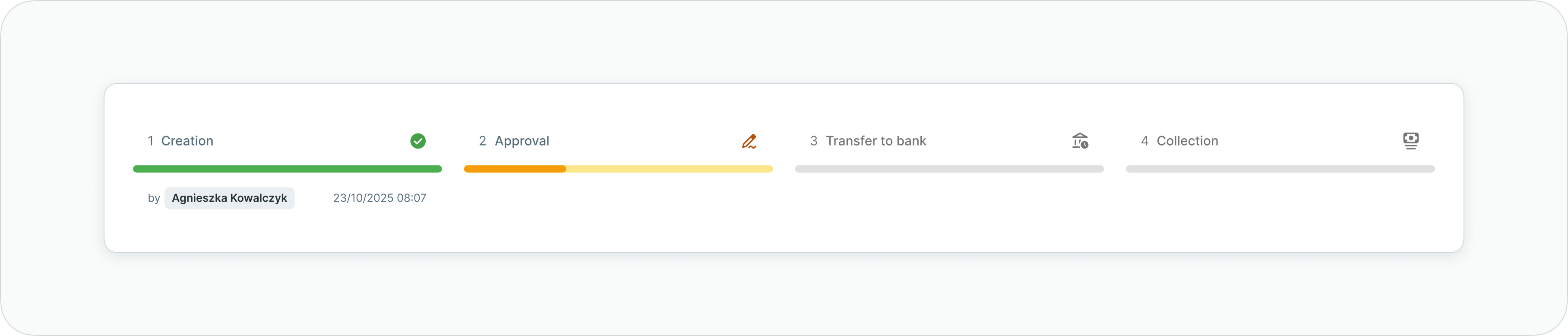
Collection timeline
Timeline stages
| Stage | Description |
|---|---|
| 1. Creation | Initial collection creation via API with creator details and timestamp |
| 2. Authorization | Overview of requested signatories and tracking of received signatures |
| 3. Bank submission | Status update showing delivery to bank with submission timestamp |
| 4. Collection | Final stage showing collection execution and settlement confirmation |
Negative status tracking
For collections encountering issues (failed, cancelled, rejected), the timeline indicates where processing stopped and displays the latest completed action, providing clear visibility into workflow interruptions.
Included direct debits
The included direct debits section displays a detailed list of all individual direct debits within the collection, enabling review of debtor-specific information and per-debit status tracking.
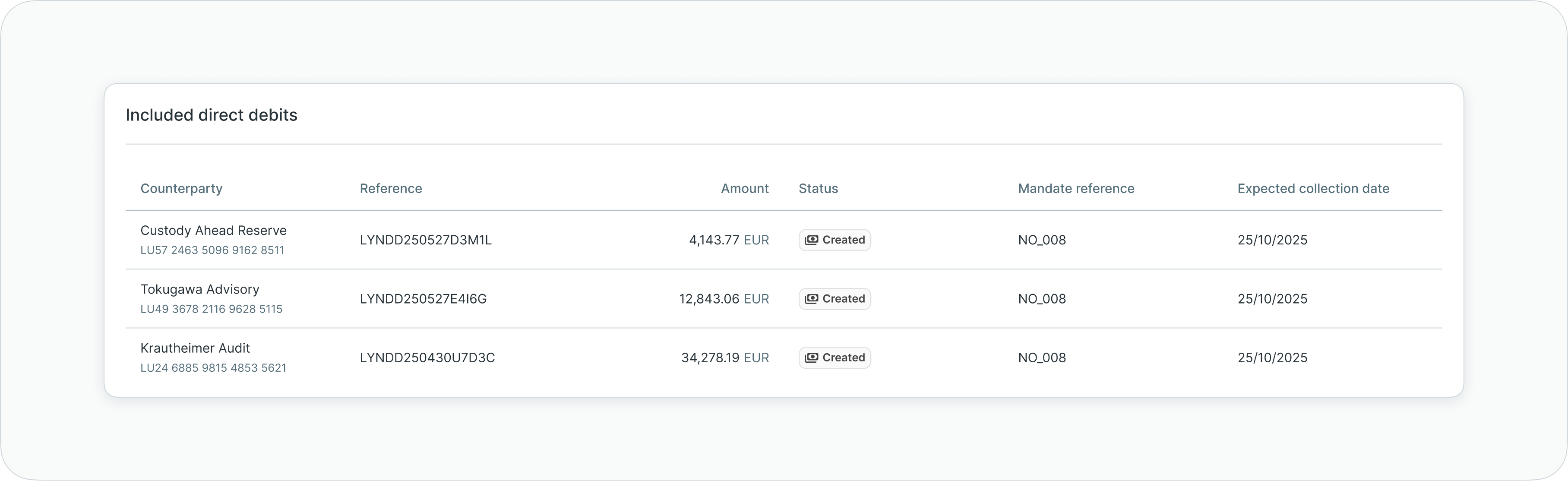
Included direct debits list
Information displayed
Each individual direct debit shows:
- Debtor counterparty name and account information
- Direct debit amount
- Expected collection date
- Individual status indicator
- Mandate reference
- Debtor account details (IBAN)
Viewing individual direct debits
To review specific direct debits within the collection:
- Scroll to the Included direct debits section
- Review the aggregated list showing all direct debits
- Check individual amounts and statuses
- Verify expected collection dates
- Identify any direct debits with issues or failures
This view enables monitoring of collection progress at the individual direct debit level, helping identify which debtors have been successfully collected and which require attention.
Audit log
The audit log maintains comprehensive traceability of all actions performed on the direct debit collection, creating a complete history for compliance and operational transparency.
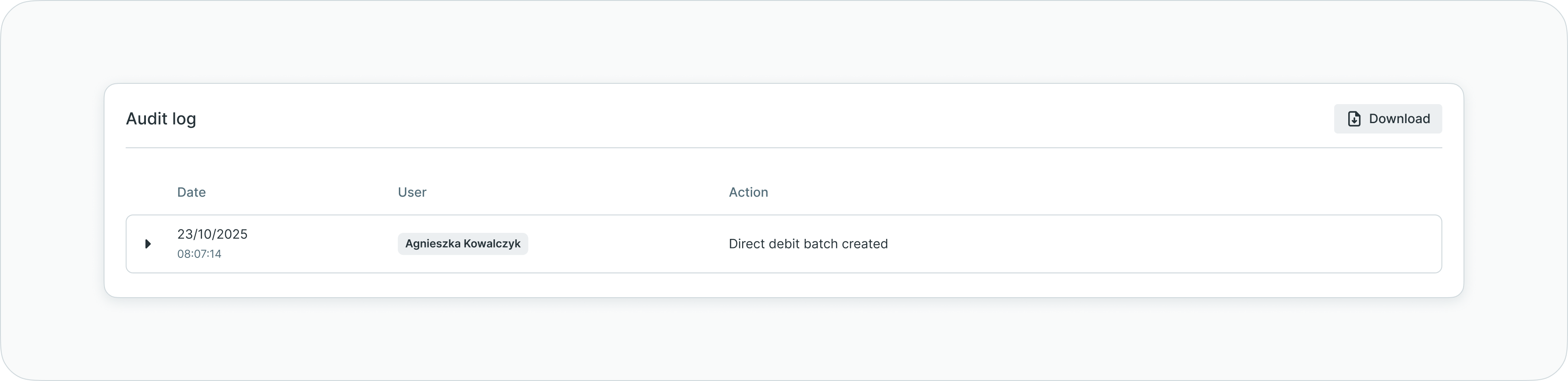
Audit log section
Logged events
The audit log captures:
- All status transitions with timestamps
- Signature actions and authorizations
- Notification triggers
- Bank acknowledgments and responses
- Manual status changes
- Collection submission events
- Complete end-to-end collection lifecycle
This detailed logging ensures users can access complete information about the latest updates and actions affecting the collection.
Managing direct debit collections
Direct debit collections support various management actions depending on their current status and processing stage.
Available actions
Management actions are accessible through:
- Action buttons in the collection details header
- Overflow menu (three dots) in collection details
- Bulk actions menu from the direct debits list (when multiple collections are selected)
Common management actions
Authorizing collections:
- Open the collection details
- Review all collection information and included direct debits
- Click the Authorize or Sign button
- Complete authentication according to your configured method
- Confirm the signature
Cancelling collections:
- Open the collection details (collection must be in cancellable status)
- Click the Cancel button or find cancel action in overflow menu
- Confirm cancellation
- The collection status updates to "Cancelled"
Resubmitting collections:
For collections that failed submission or were rejected by the bank:
- Open the collection details
- Review failure reason and correct any issues
- Click the Resubmit button
- Confirm resubmission
- The collection enters authorization or submission workflow again
Status-dependent actionsAvailable management actions depend on the collection's current status. Some actions are only available at specific processing stages.
Status definitions
Direct debit collections progress through defined statuses reflecting their position in the collection workflow.
Collection statuses
| Status | Definition |
|---|---|
| Draft | Collection created via API, not yet submitted for authorization |
| Waiting for signature(s) | Collection requires authorization from designated signatories |
| Rejected by signatory | Collection rejected during approval process by one or more signatories |
| Pending submission to bank | Collection fully authorized, awaiting bank submission |
| Submitted to bank | Collection transmitted to bank, awaiting acknowledgment |
| Pending collection | Bank acknowledged collection, direct debits pending execution |
| Partially collected | Some direct debits collected successfully, others failed or pending |
| Collected | All direct debits in collection successfully executed |
| Failed | Collection failed due to bank rejection or processing errors |
| Cancelled | Collection cancelled before execution |
Individual direct debit statusesIndividual direct debits within a collection may have different statuses. The collection status reflects the overall state, while the included direct debits section shows per-debit status details.
Best practices
Follow these recommendations to maximize the effectiveness of direct debit collection management:
- Review collections before authorization - Carefully verify all included direct debits and collection details before authorizing to prevent errors
- Monitor collection progress - Check the included direct debits section to track individual direct debit execution and identify failures
- Use filters strategically - Apply status filters to focus on collections requiring attention (waiting for signatures, partially collected, failed)
- Track expected collection dates - Monitor upcoming collection dates to ensure sufficient notification to debtors
- Review audit logs - Check audit logs when investigating collection issues or verifying action history for compliance
- Coordinate with API integration - Ensure proper communication between API-based collection creation and platform-based monitoring
- Handle failures promptly - Address failed collections or individual direct debits quickly to maintain collection efficiency
- Verify mandate validity - Ensure all debtors have valid SEPA Direct Debit mandates before creating collections
Related documentation
Explore related sections for more information:
- Platform Navigation - Detailed guide to the head-up display, table views, filters, and search functionality - Tables, filters, search, and view customization
- Permissions - Comprehensive explanation of access control and role-based permissions - Understanding access control and account scoping
- Approvals - How approval workflows and signature processes function - Authorization workflows and signatory rules
- Action Center - Centralized task and approval management - Pending collection authorizations
- Signatory Rules - Approval workflow configuration - Configuring authorization requirements
- Authentication Methods - Detailed setup and usage of SSO, LuxTrust, and mobile app authentication - Signature methods and security
- LYNKS API Documentation [https://docs.lynks.lu/reference/] - Creating direct debit collections via API
Support
For assistance with direct debit collections or questions about incoming payment management, contact [email protected].
Updated about 2 months ago