
Tenant settings approvals
Understanding the four-eyes principle for configuration changes and how draft-approve workflows maintain system stability
Introduction
Tenant settings approvals extend the four-eyes principle to platform configuration changes. When this governance mechanism is enabled, modifications to system settings require independent review and authorization before taking effect, preventing unauthorized or erroneous configuration changes from impacting operations.
This approval workflow separates configuration modification from configuration authorization. Administrators make changes in an isolated draft environment, and separate approvers review and authorize those changes before they become active. This separation ensures that configuration changes undergo scrutiny and that no single administrator can unilaterally alter critical platform settings.
Feature availabilityTenant settings approval requires the TENANT_SETTINGS_FOUR_EYES_REVIEW feature flag. This feature is enabled per organization based on governance requirements.
The draft-live concept
Tenant settings approval introduces a dual-environment model for configuration management: the live environment representing current active settings, and the draft environment where changes are prepared and reviewed.
Live environment
The live environment contains the platform's current effective configuration. This is what governs actual system behavior—which accounts are available, what signatory rules apply to payments, which users have what permissions, and so on. All users see the live configuration when they access tenant settings in view mode.
The live environment remains stable during the change process. While administrators prepare modifications in draft mode, the live configuration continues to govern platform operations unchanged. This stability prevents in-progress changes from affecting production behavior.
Draft environment
The draft environment provides an isolated workspace where administrators with write permissions can modify configuration settings. Changes made in draft mode do not immediately affect the live environment. Instead, they accumulate as pending changes awaiting approval.
Multiple administrators can work in draft mode over time, with their changes collectively forming the pending change set. The draft environment maintains these modifications separately from the live configuration until approval occurs.
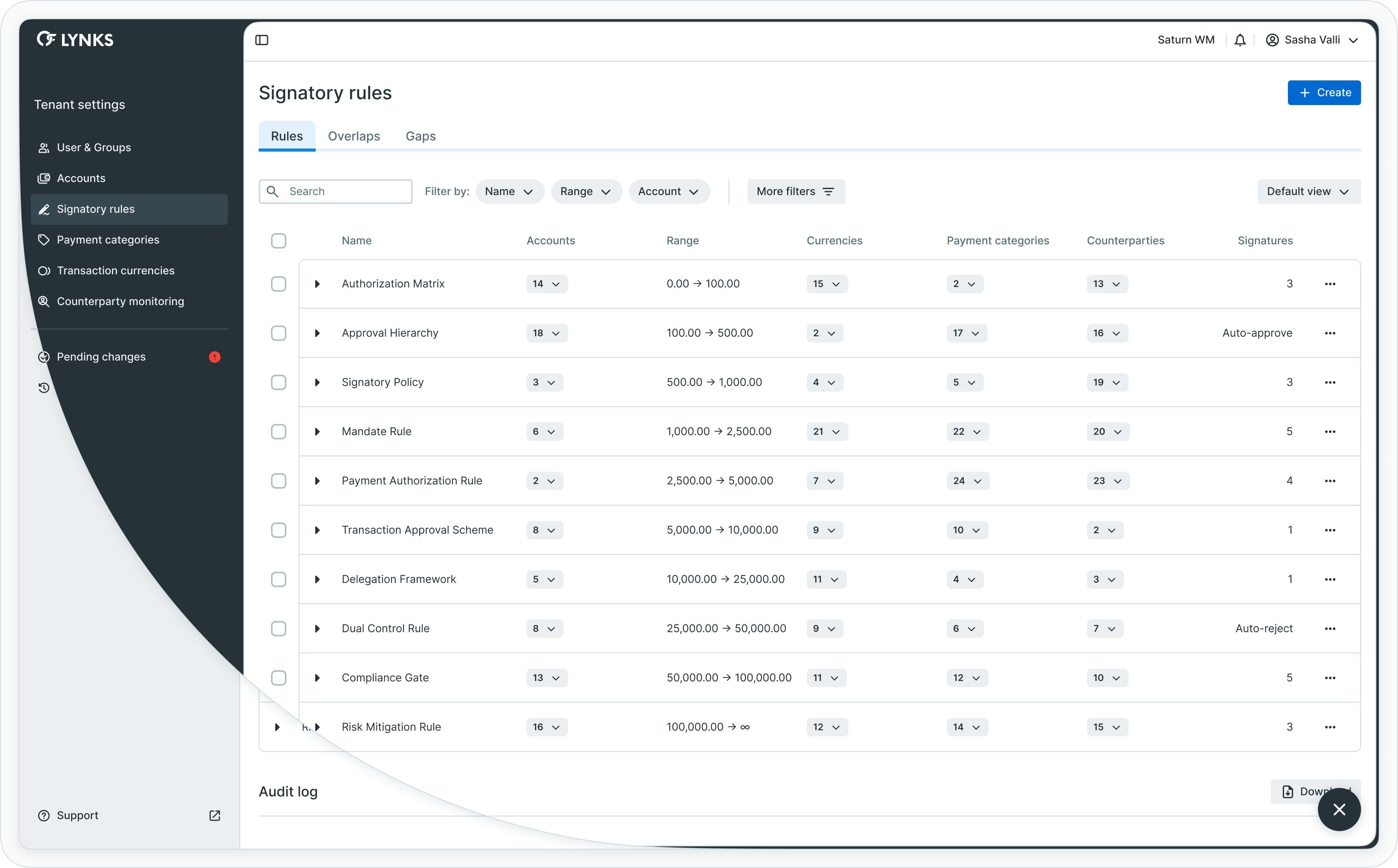
Draft and live environment separation
The approval workflow
Configuration changes follow a structured workflow from modification through review to activation.
Workflow stages
Modification in draft: An administrator with write permission enters draft mode and modifies configuration settings—creating new accounts, adjusting signatory rules, updating payment categories, modifying user permissions. These changes save to the draft environment. When the administrator exits draft mode, the modifications become pending changes awaiting approval.
Review and validation: Administrators with approval permission access the pending changes view. This interface displays all modifications in a detailed diff format, showing what will change from the current live state to the proposed new state. Approvers review these changes for accuracy, compliance, and alignment with organizational policies.
Authorization: Approvers authorize the pending changes. The system enforces the four-eyes principle by preventing users from approving changes they authored. Multiple approvers may be required depending on configuration. The system tracks approval progress, showing who has approved and how many approvals remain needed.
Activation: Once sufficient approvals are collected, the pending changes automatically apply to the live environment. The live configuration updates to reflect all approved modifications. The draft environment resets to match the new live state, ready for the next change cycle.
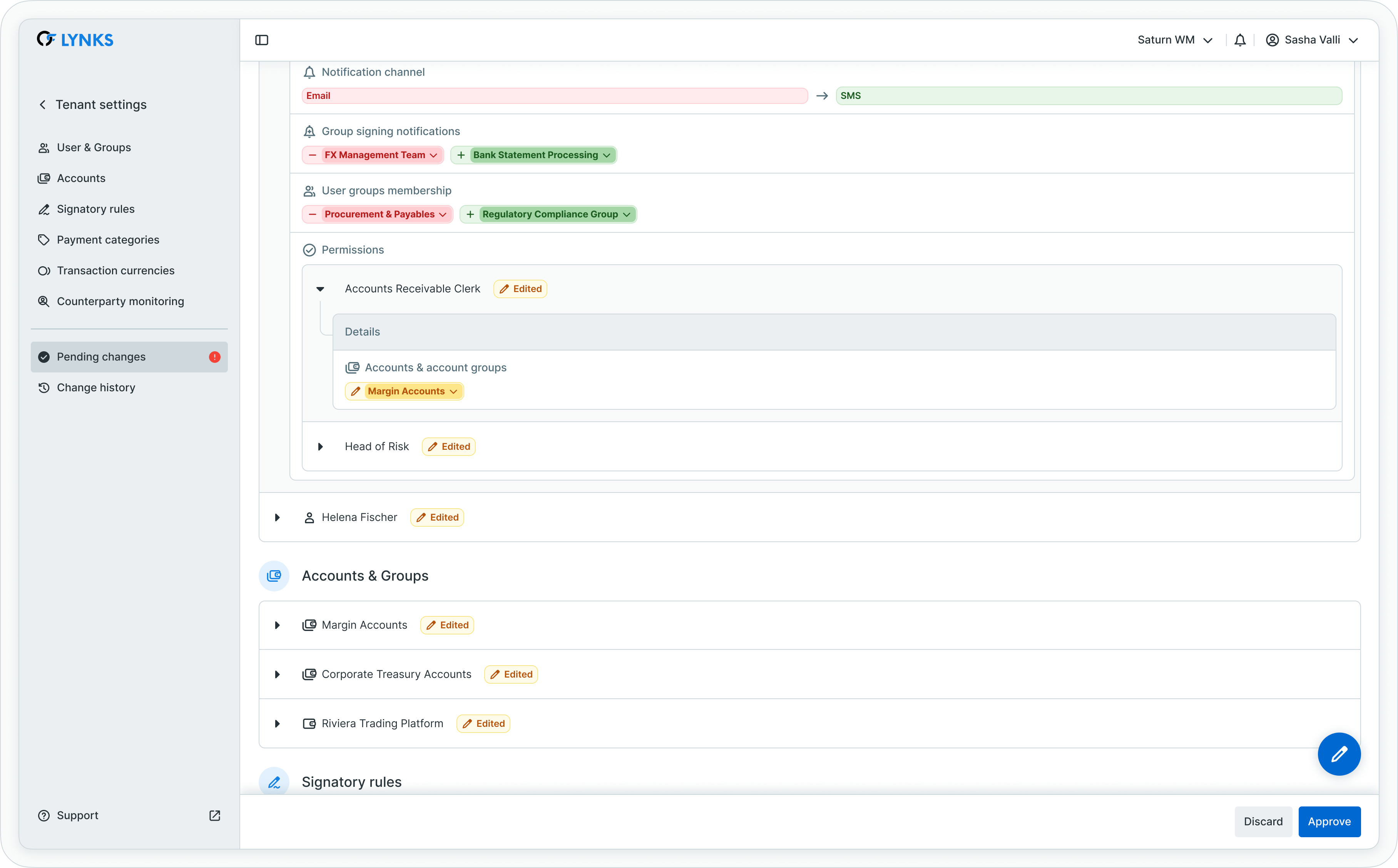
Configuration change workflow from draft to live
Change discard
Pending changes can be discarded rather than approved. This removes all modifications from the draft environment and resets it to match the live configuration. Discarding is useful when changes are no longer needed, contain errors, or need to be restarted from scratch.
The discard action requires documentation—administrators must provide a reason for discarding changes. This creates accountability and audit trail records for rejected modifications.
The four-eyes principle
The four-eyes principle (also called maker-checker) ensures that different individuals create and authorize changes.
Segregation of duties
Tenant settings approval enforces segregation through distinct permissions. Users with TENANT_SETTINGS_WRITE permission can modify configurations but cannot approve changes. Users with TENANT_SETTINGS_APPROVE permission can authorize changes but typically do not have write access. This permission split prevents any single user from both creating and approving modifications.
The system tracks authorship of changes at a granular level. When reviewing pending changes, the approval system identifies which users made which modifications. An approver cannot authorize pending changes if those changes include modifications they authored, even if other users also made changes in the same draft session.
Flexible approval requirements
The approval workflow adapts dynamically based on who made changes and who is approving, maintaining the four-eyes principle while optimizing for different contribution scenarios.
Single administrator changes: When a single administrator makes all pending changes, the system requires one approval from a different administrator. This ensures the four-eyes principle by requiring an independent reviewer who did not contribute to the changes.
Multiple administrator changes: When multiple administrators contribute to pending changes, the approval requirements become more flexible:
- One uninvolved approver: An administrator who did not contribute to any of the pending changes can approve with a single signature
- Two contributor approvers: Two administrators who contributed to the changes can each provide approval, as their mutual review satisfies the four-eyes principle
The system tracks which administrators contributed to the pending changes. Contextual warnings and dialogs guide approvers through the requirements, showing how many approvals are needed and from whom. The audit log records all approval actions and authorship details for complete authorization history.
For single-administrator organizations where four-eyes separation is impossible, the system can be configured to bypass the separate approver requirement. However, even in this mode, the draft-approve workflow and audit trail remain active.
Governed configuration areas
Tenant settings approval applies to specific configuration areas that significantly impact platform behavior.
Configuration entities
When the approval feature is enabled, changes to these entities require authorization:
Accounts define which bank accounts are available for transactions and how they are grouped. Changes to accounts affect which payment options users see and how permissions apply.
Signatory rules control payment authorization requirements. Modifications to signatory rules directly impact payment approval workflows and who can authorize transactions.
Payment categories classify different transaction types. Changes to categories affect how payments are organized, reported, and governed by signatory rules.
Transaction currencies determine which currencies are available for transactions. Currency changes impact payment creation options and exchange rate handling.
User permissions control who can access which platform features and data. Permission changes directly affect user capabilities and data visibility.
Each of these areas contains configuration that can significantly impact operations if changed incorrectly. The approval workflow provides a safety mechanism to catch errors before they affect the live environment.
Governance benefits
Tenant settings approval provides multiple governance benefits beyond basic error prevention.
Change validation
The approval workflow creates a mandatory validation step. Before configuration changes take effect, a second set of eyes reviews the modifications. This review can catch errors, identify unintended consequences, and ensure changes align with organizational policies.
The detailed diff view provided to approvers makes it easy to understand exactly what will change. This transparency supports informed authorization decisions.
Audit trail
Every configuration change generates comprehensive audit records. These records document who made changes, what changed, who approved the changes, and when changes became active. For discarded changes, the audit trail captures who discarded them and why.
This complete history supports compliance requirements, troubleshooting, and operational analysis. Organizations can trace configuration evolution over time and understand the context of past changes.
Operational stability
By isolating draft changes from the live environment, the approval workflow maintains operational stability during the change process. Configuration modifications do not affect production behavior until formally approved and activated. This separation prevents partially-complete or experimental changes from disrupting operations.
Related documentation
Explore related sections for more information:
- Pending Changes - Configuration change management - Detailed instructions on using the tenant settings approval workflow
- Tenant Settings - Administrative configuration for users, accounts, and rules - Configuration of specific tenant settings entities
- Payment Approvals - Payment approval concepts and workflows - Payment approval concepts and workflows
Support
For questions about tenant settings approval concepts or governance strategy, contact [email protected].
Updated about 2 months ago