
Tenants & Multi-tenancy
Understanding tenant isolation, data separation, and multi-tenant access in LYNKS
Introduction
A tenant in LYNKS represents an independent organization or business entity with complete data isolation and separate configuration. Each tenant operates as a distinct environment with its own users, accounts, payments, counterparties, and settings, ensuring that data from one organization never mixes with another.
LYNKS supports both single-tenant users, who work within one organization only, and multi-tenant users, who can access multiple organizations and switch between them. This flexibility serves various business scenarios, from standard corporate users to service providers, consultants, and holding companies managing multiple entities.
Understanding tenants is fundamental to working with LYNKS, as tenant-level configuration controls which features are available, how permissions are structured, and what data users can access.
What is a tenant in LYNKS
A tenant represents a single organization or business entity within the LYNKS platform. Each tenant is a completely isolated environment with its own configuration, users, and data.
Tenant characteristics:
- Independent organization - Each tenant corresponds to one legal entity or organizational unit
- Unique configuration - Feature flags, settings, and workflows are configured per tenant
- Separate user base - Users, groups, and permissions are managed independently for each tenant
- Isolated data - All financial data, payments, and counterparties belong exclusively to one tenant
- Custom branding - Each tenant can have its own URL subdomain (e.g.,
https://yourcompany.lynks.lu)
What belongs to a tenant:
- Bank accounts and transaction history
- Users and user groups with their permissions
- Credit transfers, direct debits, and other payment types
- Counterparties and blacklisted accounts
- Signatory rules and approval workflows
- Payment categories and currency configurations
- Feature flags and tenant settings
Tenant isolation and data separation
LYNKS enforces strict data isolation between tenants, ensuring complete separation at all levels of the platform. Each tenant operates independently with no possibility of cross-tenant data access or visibility.
Data separation guarantees:
- Complete database isolation - Tenant data is segregated to prevent any cross-tenant queries or access
- User access boundaries - Users can only see data from tenants they are explicitly granted access to
- Session isolation - When working within a tenant, only that tenant's data is visible and accessible
- Configuration independence - Changes to one tenant's settings never affect other tenants
- Audit trail separation - Activity logs and audit records are maintained separately per tenant
Security implications:
The multi-tenant architecture ensures that your organization's sensitive financial data remains private and secure. Even if a user has access to multiple tenants, they can only view data from one tenant at a time, and must explicitly switch contexts to access another organization's information.
This isolation model supports compliance requirements for data segregation and provides clear organizational boundaries, making LYNKS suitable for regulated financial environments where data separation is mandatory.
Multi-tenant user access
Users in LYNKS can be granted access to multiple tenants, enabling them to work across different organizations without needing separate accounts. This capability is particularly valuable for service providers, consultants, holding company administrators, and other professionals who manage financial operations for multiple entities.
How multi-tenant access works:
When a user is configured with access to multiple tenants, they can switch between organizations using the tenant switcher located in the top navigation bar. The switcher displays all tenants the user has access to and allows seamless transition between them.
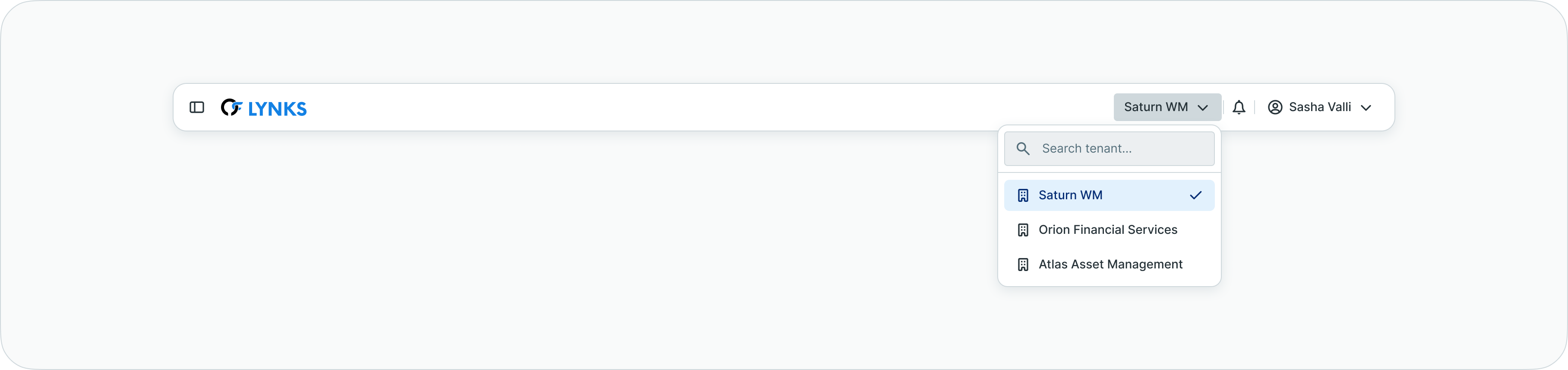
Tenant switcher showing available organizations for multi-tenant users
Key characteristics of multi-tenant users:
- Independent permissions per tenant - A user may have different roles and permissions in each tenant (e.g., administrator in one tenant, approver in another)
- Separate contexts - When working in a tenant, users only see that organization's data, accounts, and transactions
- Session persistence - The platform remembers which tenant was last accessed and returns to it on next login
- Unified authentication - Users authenticate once and can switch between tenants without re-authenticating
- Granular access control - Administrators control which users can access which tenants and with what permissions
Use cases for multi-tenant access:
| User Type | Scenario | Access Pattern |
|---|---|---|
| Service Provider | Manages banking operations for multiple clients | Full access to multiple client tenants with administrative permissions |
| Consultant | Provides treasury advisory across organizations | Read-only or limited access to multiple tenants for analysis |
| Holding Company Admin | Oversees group entities | Administrative access to parent company and subsidiary tenants |
| Shared Services Team | Processes payments for multiple business units | Operational access to multiple tenants with payment creation rights |
| Auditor | Reviews financial operations | Read-only access to multiple tenants for compliance verification |
Tenant-specific configuration
Each tenant maintains its own independent configuration, allowing organizations to customize LYNKS according to their specific requirements and workflows. Configuration changes in one tenant never affect other tenants.
Tenant-level settings include:
- Feature flags - Enable or disable specific functionality (see Feature Flags - Available features and enablement)
- Users and groups - User accounts, roles, and permission structures (see User & Groups - User management and access configuration)
- Bank accounts - Ordering party accounts and account groups (see Accounts - Account configuration and groups)
- Signatory rules - Multi-level approval workflows (see Signatory Rules - Approval workflow configuration)
- Payment categories - Custom payment classifications (see Payment Categories - Payment classification setup)
- Transaction currencies - Enabled currencies and exchange rates (see Transaction Currencies - Multi-currency handling and exchange rates)
- Counterparty monitoring - AML/CFT compliance settings (see Counterparty Monitoring - Configure ongoing monitoring)
Configuration independence:
Because each tenant has separate configuration, organizations can:
- Enable different features based on their needs
- Implement unique approval workflows matching their governance structure
- Configure permissions reflecting their organizational hierarchy
- Maintain different security policies and compliance requirements
- Set up custom payment categories aligned with their accounting structure
This independence ensures that LYNKS adapts to each organization's specific requirements rather than forcing all tenants to follow a single standard configuration.
Switching between tenants
For users with multi-tenant access, LYNKS provides a tenant switcher in the top navigation bar, allowing quick transition between organizations without logging out and back in.

Top navigation bar showing the current tenant name and switcher location
How to switch tenants:
- Click on the current tenant name in the top navigation bar
- A dropdown menu displays all tenants you have access to
- Select the desired tenant from the list
- The interface reloads with the selected tenant's data and configuration
What happens when switching tenants:
- Complete context change - All visible data switches to the selected tenant
- Permission refresh - Your permissions for the new tenant take effect
- Configuration update - Feature availability and settings reflect the new tenant's configuration
- Session persistence - LYNKS remembers your last active tenant for your next login
Tenant Switcher VisibilityThe tenant switcher only appears if you have access to multiple tenants. Single-tenant users do not see the switcher since they have no other organizations to switch to.
Best practices for multi-tenant users:
- Verify current tenant - Always check which tenant you're working in before creating payments or making changes
- Organize by purpose - Group similar tasks within the same tenant to minimize context switching
- Use descriptive tenant names - Work with administrators to ensure tenant names clearly identify the organization
- Understand different permissions - Remember that your capabilities may vary between tenants
Single tenant vs multi-tenant comparison
The table below outlines the key differences between single-tenant and multi-tenant user experiences in LYNKS:
| Feature | Single Tenant User | Multi-Tenant User |
|---|---|---|
| Tenant Access | Access to one organization only | Access to multiple organizations |
| Tenant Switcher | Not available (no need to switch) | Available in top navigation to switch between tenants |
| Data Visibility | Only data from assigned tenant | Only data from currently selected tenant (one at a time) |
| Permissions | Single set of permissions for one tenant | Different permissions per tenant |
| Configuration | One tenant's settings apply | Each tenant has independent settings |
| Use Case | Standard corporate user | Service providers, consultants, holding companies |
| Session Context | Single tenant context throughout | Must switch tenant to access different organization data |
| Navigation | Direct access to all features in their tenant | Must select tenant first, then access features |
| Audit Trail | Actions logged to one tenant | Actions logged separately per tenant context |
Related documentation
Explore these related sections to learn more about working with LYNKS:
Core Concepts:
- Platform Navigation - Detailed guide to the head-up display, table views, filters, and search functionality - Using the sidebar navigation and navigating LYNKS interface
- Feature Flags - Available features and enablement - Tenant-level feature configuration
- Permissions - Comprehensive explanation of access control and role-based permissions - Understanding access control and user rights
Tenant Settings:
- User & Groups - User management and access configuration - Managing users and configuring multi-tenant access
- Accounts - Account configuration and groups - Viewing and managing ordering party accounts
- Signatory Rules - Approval workflow configuration - Configuring tenant-specific approval workflows
- Pending Changes - Configuration change management - Reviewing tenant configuration changes
- Change History - Audit trail for configuration - Audit trail for tenant settings
Security & Authentication:
- Authentication Methods - Detailed setup and usage of SSO, LuxTrust, and mobile app authentication - Login methods configured per tenant
- Compliance & Audit - Security features, audit trails, and regulatory compliance - Tenant isolation and compliance features
Support
For questions about tenant configuration, multi-tenant access, or assistance with tenant switching, contact [email protected].
Updated 3 months ago